
TL;DR: Being responsive to emails means replying promptly, professionally, and clearly to messages you receive. It involves acknowledging emails within 24-48 hours, providing complete answers, maintaining a courteous tone, and setting expectations for longer responses. Effective email responsiveness builds trust, strengthens professional relationships, and demonstrates reliability in business communications.
Frequently Asked Questions
What does it mean to be responsive to emails in cold outreach?
Being responsive to emails means replying promptly and professionally to incoming messages, typically within 24 hours. In cold email campaigns, responsiveness demonstrates professionalism, builds trust with prospects, and increases conversion rates. Quick responses show you value the recipient’s time and are serious about establishing a business relationship, which significantly improves reply rates and engagement metrics.
How can I improve my email response rate in cold campaigns?
Improve response rates by personalizing email content, crafting compelling subject lines, keeping messages concise, and including clear calls-to-action. Use automation tools to send follow-ups at optimal times, segment your audience for targeted messaging, and A/B test different approaches. Ensure your emails provide genuine value and avoid spam triggers. Timing matters—send emails when recipients are most likely to check their inbox.
Why is being responsive to emails important for CRM inside sales?
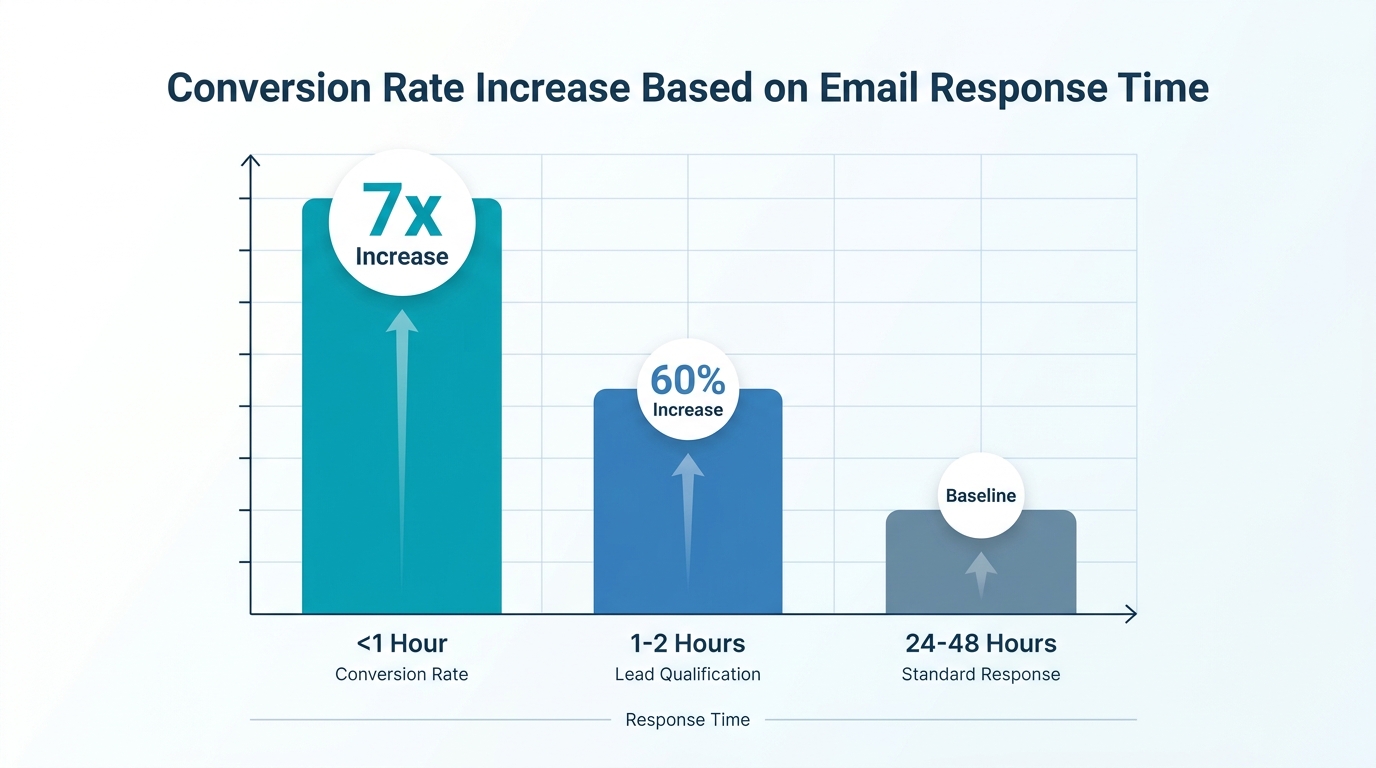
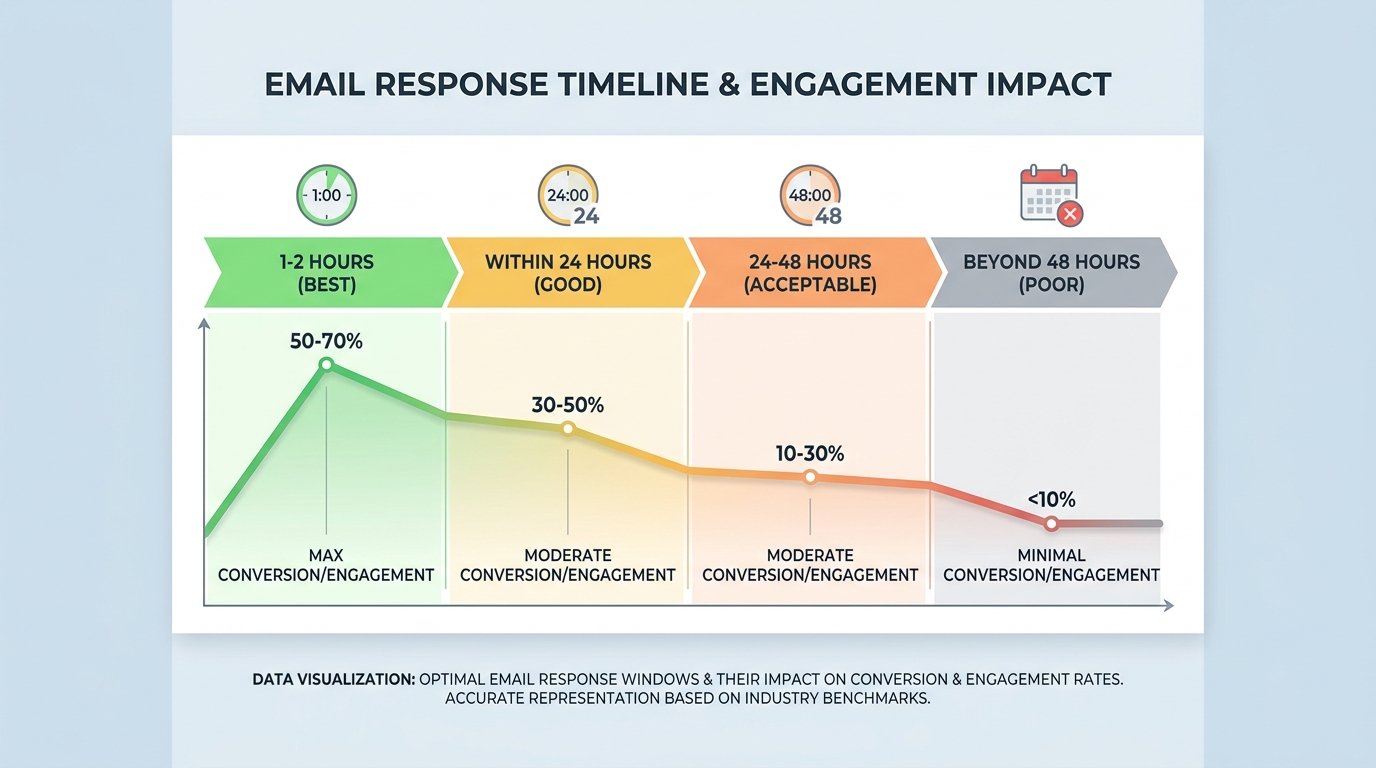
Email responsiveness directly impacts inside sales success by maintaining prospect engagement and accelerating the sales cycle. Quick responses prevent leads from going cold and demonstrate your commitment to customer service. CRM systems help track email interactions, set reminders for follow-ups, and automate responses, ensuring no opportunity slips through. Studies show that responding within the first hour increases conversion rates by up to 7 times.
How do I set up automated responses for my Gmail email account?
To set up automated responses in Gmail, go to Settings (gear icon), select ‘See all settings,’ then scroll to ‘Vacation responder.’ Enable it, set your date range, compose your message, and save changes. For more advanced automation in cold email campaigns, use dedicated tools that integrate with Gmail to send personalized follow-ups, track opens, and manage replies at scale while maintaining a human touch.
What are the best practices for writing responsive email templates?
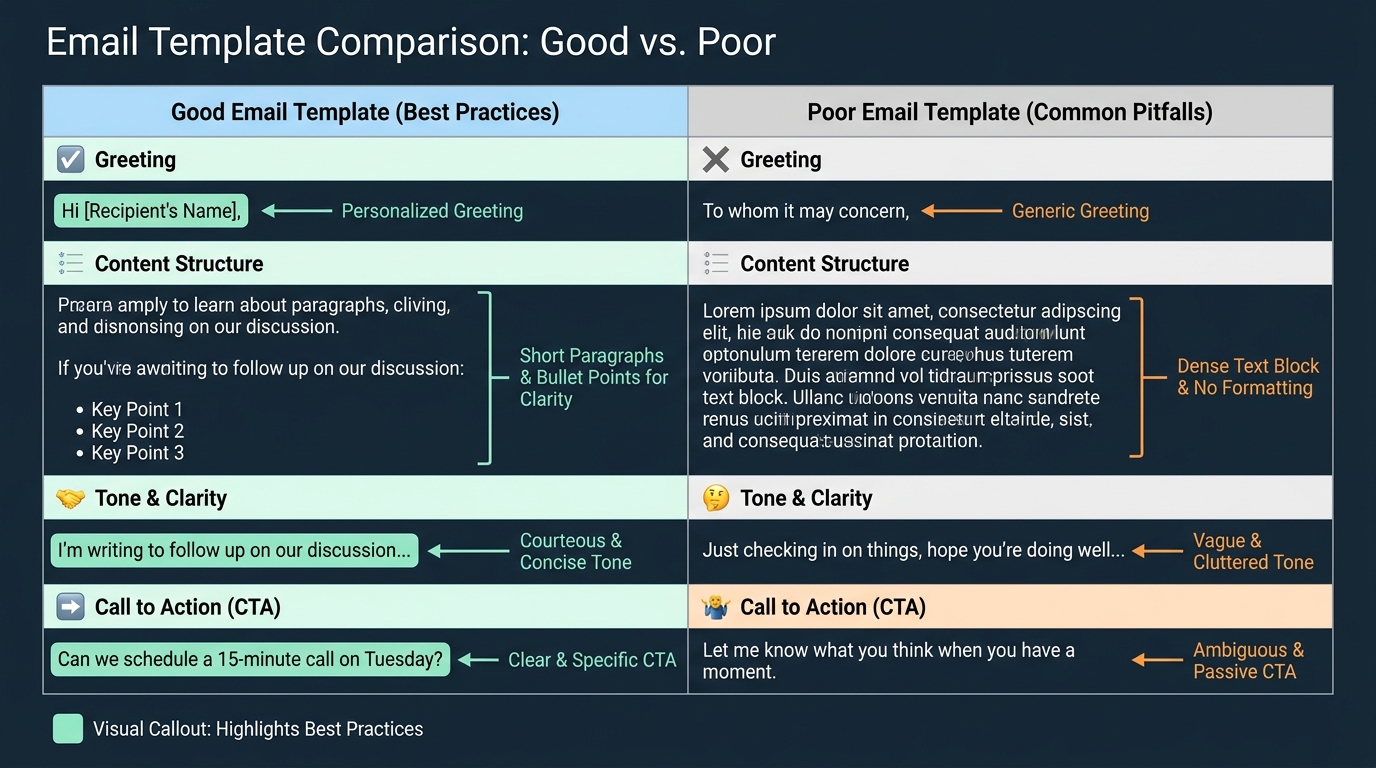
Effective responsive email templates include personalized greetings, concise value propositions, clear subject lines, and mobile-friendly formatting. Keep paragraphs short (2-3 sentences), use bullet points for readability, and include one specific call-to-action. Templates should be adaptable for different prospects while maintaining consistency. Test templates across various email clients like Gmail, Yahoo, Hotmail, and AT&T email to ensure proper rendering and deliverability.
How can I track if recipients are responsive to my cold emails?
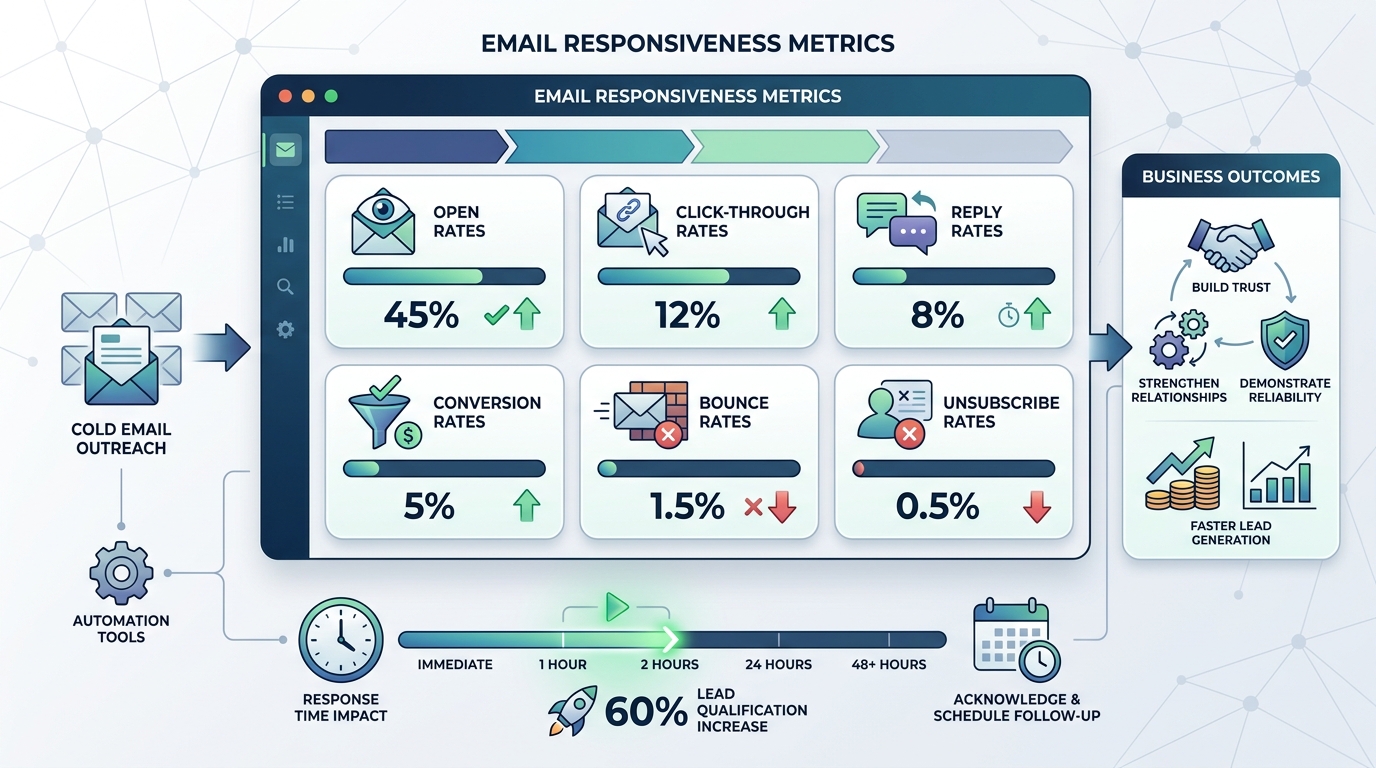
Track email responsiveness using metrics like open rates, click-through rates, reply rates, and conversion rates. Cold email automation tools provide real-time analytics showing who opened emails, clicked links, and responded. Monitor bounce rates and unsubscribe rates to gauge list quality. Set up tracking pixels and link parameters to measure engagement. These insights help optimize campaigns and identify the most responsive segments for better targeting.
What email providers are best for managing responsive cold email campaigns?
Professional email providers like Gmail (G Suite/Google Workspace), Outlook, and custom domain emails through GoDaddy offer reliability and deliverability for cold campaigns. Avoid free personal accounts like AT&T email, Yahoo, or Hotmail for business outreach as they have lower deliverability rates. Use dedicated cold email platforms that integrate with your primary email account to manage campaigns, automate follow-ups, and maintain high inbox placement rates.
How quickly should I be responsive to email replies in sales outreach?
Respond to email replies within 1-2 hours during business hours for maximum impact. Research shows that responding within the first hour increases lead qualification rates by 60%. For automated campaigns, set up instant notifications for replies so you can engage promptly. Use CRM tools to prioritize hot leads and schedule follow-ups. Even if you can’t provide a complete answer immediately, acknowledge receipt and set expectations for detailed responses.
Why Being Responsive to Emails Transforms Your Business Communication
In today’s fast-paced digital landscape, being responsive to emails isn’t just about courtesy—it’s a critical business skill that directly impacts your success, reputation, and bottom line. Whether you’re managing cold outreach campaigns, handling customer inquiries, or coordinating with team members, your email response time speaks volumes about your professionalism and reliability.
Email responsiveness has become a competitive advantage that separates thriving businesses from those that struggle to maintain relationships. Studies show that professionals who respond promptly to emails build stronger trust with clients, close deals faster, and maintain higher customer satisfaction rates.
This comprehensive guide explores the essential strategies, tools, and best practices for becoming exceptionally responsive to emails while maintaining quality and personalization at scale. 📧
Understanding Email Responsiveness: What It Really Means
The Definition of Email Responsiveness
Email responsiveness encompasses more than just speed—it’s about providing timely, relevant, and helpful replies that move conversations forward. Being responsive means acknowledging receipt, setting clear expectations, and following through on commitments.
For sales teams conducting B2B outreach campaigns, responsiveness can make the difference between landing a meeting and losing a prospect to a competitor. The same principle applies whether you’re managing my emails yahoo account or coordinating through enterprise platforms.
Why Response Time Matters More Than Ever
Modern professionals expect quick responses across all communication channels. Here’s why email response time has become crucial:
- Trust Building: Quick responses demonstrate reliability and commitment to relationships
- Competitive Edge: First responders often win deals in competitive markets
- Customer Satisfaction: Prompt replies reduce frustration and improve overall experience
- Opportunity Capture: Delayed responses mean missed opportunities and lost revenue
Setting Up Your Email Infrastructure for Maximum Responsiveness
Choosing the Right Email Platform
Your email platform significantly impacts your ability to stay responsive. Whether you’re using Gmail, Yahoo, Outlook, or a professional domain through providers like GoDaddy, each platform offers unique features that can enhance or hinder your responsiveness.
For those starting fresh, learning how to create a Gmail email account provides access to powerful organizational tools, smart filtering, and mobile accessibility. If you need to set up professional email domains, understanding GoDaddy and email integration is essential for business credibility.
Essential Email Account Management
Managing multiple email accounts requires strategic organization. Here’s how to stay on top of various platforms:
| Platform | Best Use Case | Key Responsiveness Features |
|---|---|---|
| Gmail | Personal & Business | Smart categorization, mobile apps, integration ecosystem |
| Yahoo Mail | Personal Communication | Disposable addresses, large storage, customizable themes |
| Outlook/Hotmail | Enterprise & Professional | Calendar integration, focused inbox, Microsoft ecosystem |
| Custom Domain (GoDaddy) | Business Branding | Professional appearance, custom addresses, enhanced credibility |
Mastering Email Access Across Devices
To maintain responsiveness, you need seamless access to your email accounts. Whether you need to log into hotmail email, manage sign in for att email credentials, or access email with att net on mobile devices, consistent access is fundamental.
Set up your accounts on multiple devices—desktop, laptop, tablet, and smartphone—to ensure you can respond regardless of your location. Enable push notifications for priority senders while filtering less urgent messages to avoid notification fatigue. 📱
Strategies for Maintaining High Email Responsiveness
The Time-Block Method for Email Management
Rather than constantly checking email throughout the day, successful professionals use time-blocking to maintain responsiveness without sacrificing productivity. This approach involves dedicating specific periods to email management while protecting deep work time.
Implement these time-block strategies:
- Morning Review (30 minutes): Address urgent items and set priorities
- Midday Check (20 minutes): Respond to time-sensitive messages
- Afternoon Batch (45 minutes): Handle detailed responses and follow-ups
- Evening Sweep (15 minutes): Clear remaining items and prepare for tomorrow
Priority-Based Response Systems
Not all emails deserve immediate attention. Develop a prioritization system that helps you respond appropriately to different message types:
- Urgent & Important: Respond within 1 hour (client emergencies, hot leads)
- Important but Not Urgent: Respond within 4-6 hours (project updates, scheduled meetings)
- Routine Communications: Respond within 24 hours (newsletters, general inquiries)
- Low Priority: Respond within 48 hours or batch process (promotional content, FYI messages)
Creating Effective Email Templates
Templates dramatically improve response time while maintaining quality communication. For marketing professionals managing lead generation activities, having pre-written responses for common scenarios is invaluable.
Develop templates for these common situations:
- Initial inquiry acknowledgments
- Meeting scheduling requests
- Follow-up messages after calls or meetings
- Status update requests
- Out-of-office notifications
When crafting templates, remember that understanding how can we write email professionally involves personalization. Always customize template elements with recipient-specific details to maintain authenticity. ✍️
Leveraging Technology for Enhanced Email Responsiveness
Email Automation Tools for Outreach
For sales teams and business development representatives seeking qualified leads, automation tools transform email responsiveness from a manual burden into a scalable system. Cold email automation platforms allow you to personalize at scale while maintaining timely follow-ups.
Modern cold email automation tools enable you to set up sequences that automatically send follow-ups based on recipient behavior, ensuring no lead falls through the cracks. These platforms track opens, clicks, and replies, allowing you to prioritize your manual responses to the most engaged prospects.
CRM Integration for Inside Sales Teams
Integrating your email with a crm inside sales system creates a unified workflow that enhances responsiveness. When your email conversations sync automatically with your CRM, you gain instant context about each contact, previous interactions, and next steps.
Key benefits of CRM-email integration include:
- Automatic logging of all email communications
- Instant access to contact history and context
- Triggered reminders for follow-up actions
- Team visibility into customer conversations
- Performance metrics and response time tracking
Mobile Email Management Solutions
Your smartphone is your most powerful tool for maintaining email responsiveness on the go. Configure your mobile email apps to support quick, effective responses even when you’re away from your desk.
Optimize mobile responsiveness by:
- Using voice-to-text for faster message composition
- Setting up quick reply shortcuts for common responses
- Enabling VIP alerts for priority contacts
- Using mobile-optimized email signatures
- Syncing across all devices for seamless continuity
Best Practices for Professional Email Responsiveness
The Art of the Acknowledgment Email
When you can’t provide a complete response immediately, send a quick acknowledgment. This simple practice dramatically improves perceived responsiveness and sets clear expectations.
Effective acknowledgment emails include:
- Confirmation that you received the message
- Estimated timeline for a detailed response
- Any immediate information you can provide
- Next steps or actions you’re taking
For situations requiring more nuanced communication, explore alternative phrases to express gratitude for patience that maintain professionalism while managing expectations. 🙏
Managing Email Overload Without Sacrificing Responsiveness
High-volume email users face unique challenges in maintaining responsiveness. Implement these strategies to handle large volumes effectively:
| Strategy | Implementation | Expected Impact |
|---|---|---|
| Inbox Zero Method | Process every email to completion or delegation | Reduced mental load, clearer priorities |
| Two-Minute Rule | Respond immediately if it takes under 2 minutes | Faster inbox clearance, fewer pending items |
| Unsubscribe Aggressively | Remove yourself from non-essential lists | 50-70% reduction in incoming volume |
| Delegate Appropriately | Forward non-critical items to team members | Focus on high-value communications |
Setting Boundaries While Staying Responsive
Constant availability leads to burnout. Establish healthy boundaries that allow you to be responsive during work hours while protecting personal time:
- Communicate your typical response timeframes in your email signature
- Use auto-responders during off-hours or vacations
- Disable non-urgent notifications outside business hours
- Batch process less critical emails during designated times
If you’ve ever needed to recall or withdraw a Gmail email after sending, you understand the importance of thoughtful, unhurried responses over hasty replies. 💡
Advanced Email Responsiveness Techniques
Crafting the Perfect “From” Line for Cold Emails
For startup founders building customer acquisition pipelines, the “from” line is your first impression. A well-crafted sender name significantly impacts open rates and initial responsiveness from recipients.
Learn proven strategies from the best from line approaches for cold emails that increase engagement and response rates. Your sender identity should balance professionalism with approachability, making recipients more likely to open and respond. 📬
Email Recovery and Account Management
Maintaining responsiveness requires reliable access to your accounts. Technical issues shouldn’t prevent you from responding promptly. Familiarize yourself with gmail email account recovery procedures and ensure you have backup access methods configured.
Protect your email responsiveness by:
- Setting up recovery phone numbers and backup emails
- Enabling two-factor authentication for security
- Documenting account credentials securely
- Creating backup email accounts for critical communications
- Regularly updating security settings and recovery information
Finding and Connecting with Prospects
Responsiveness extends beyond replying—it includes proactive outreach. Business development representatives need efficient methods for finding contact information. Learn proven methods for finding someone’s email on Facebook and other platforms to expand your outreach capabilities.
When you’re creating new communication channels, understanding how i make new email accounts for different purposes helps segment your communications and maintain organized responsiveness across various business functions. 🎯
Measuring and Improving Your Email Responsiveness
Key Metrics to Track
You can’t improve what you don’t measure. Track these essential email responsiveness metrics:
- Average Response Time: Mean time between receiving and replying to emails
- First Response Time: Time to initial acknowledgment or reply
- Response Rate: Percentage of emails that receive responses
- Resolution Time: Time from initial inquiry to complete resolution
- Inbox Zero Achievement: Frequency of clearing your inbox completely
Continuous Improvement Strategies
Improving email responsiveness is an ongoing process. Implement these continuous improvement practices:
| Practice | Frequency | Purpose |
|---|---|---|
| Weekly Email Audit | Every Friday | Identify bottlenecks and recurring issues |
| Template Review | Monthly | Update and optimize standard responses |
| Tool Evaluation | Quarterly | Assess effectiveness of automation and apps |
| Process Refinement | Bi-annually | Overhaul workflows based on performance data |
Learning from Email Response Patterns
Analyze your email patterns to identify opportunities for improvement. Notice which types of emails take longest to answer, which senders you consistently delay responding to, and what times of day you’re most efficient.
Use these insights to restructure your email management approach, adjusting your schedule and priorities to maximize responsiveness where it matters most. 📊
Building a Responsive Email Culture in Your Organization
Team-Wide Email Responsiveness Standards
Individual responsiveness matters, but organizational standards create consistent customer experiences. Establish clear email response expectations across your team:
- Define response time targets for different message types
- Create escalation procedures for urgent requests
- Implement shared inbox management for team accounts
- Develop standardized templates for common scenarios
- Schedule regular training on email best practices
Hiring for Email Responsiveness
When building your team, email responsiveness should be a key evaluation criterion. For those looking to expand their outreach capabilities, exploring cold email lead generation vacancies can help you find professionals who understand the importance of timely, effective communication.
During interviews, assess candidates’ email management skills by asking about their typical response times, organization systems, and how they prioritize competing demands. 💼
Technology Stack for Team Responsiveness
Equip your team with tools that support collective responsiveness:
- Shared Inbox Solutions: Enable team members to collaborate on responses
- Email Assignment Systems: Automatically route messages to appropriate team members
- Response Tracking Dashboards: Monitor team-wide metrics and identify bottlenecks
- Knowledge Bases: Provide quick access to information for faster, accurate responses
- Collaboration Tools: Facilitate internal discussion about complex customer inquiries
Common Email Responsiveness Challenges and Solutions
Overcoming Email Anxiety
Many professionals experience email anxiety—the stress associated with overflowing inboxes and delayed responses. This psychological barrier significantly impacts responsiveness.
Combat email anxiety by:
- Breaking large backlogs into manageable chunks
- Using the “declare email bankruptcy” approach when necessary
- Focusing on forward progress rather than perfection
- Celebrating small wins in inbox management
- Seeking support when overwhelmed
Managing Difficult or Negative Emails
Responding to complaints, criticism, or difficult situations requires special attention. These emails often get delayed because they’re uncomfortable to address.
Handle challenging emails effectively by:
- Acknowledging receipt immediately, even if you need time to formulate a complete response
- Taking time to cool down before responding to emotionally charged messages
- Using empathy and understanding in your tone
- Focusing on solutions rather than defensiveness
- Escalating to managers or specialists when appropriate
Dealing with Email Overload During Peak Periods
Product launches, seasonal rushes, or company events can create temporary email surges. Maintain responsiveness during high-volume periods through:
- Temporary auto-responders explaining increased response times
- Additional team members assigned to email management
- Simplified response protocols for common inquiries
- Extended working hours or shift coverage
- Post-peak review to identify process improvements
The Future of Email Responsiveness
AI and Automation Trends
Artificial intelligence is transforming email responsiveness. Smart reply suggestions, automated categorization, and predictive text are becoming standard features that enhance response speed without sacrificing quality.
Emerging technologies include:
- AI-Powered Draft Generation: Systems that create contextually appropriate response drafts
- Sentiment Analysis: Tools that prioritize emails based on emotional urgency
- Smart Scheduling: Algorithms that optimize send times for maximum engagement
- Automated Follow-Ups: Systems that send reminders when responses are overdue
Evolving Communication Expectations
As communication channels multiply, email responsiveness standards continue to evolve. Understanding these trends helps you stay ahead:
Modern professionals expect omnichannel responsiveness—consistent experiences across email, chat, social media, and phone. Your email strategy should integrate with broader communication approaches.
The shift toward asynchronous communication means email responsiveness increasingly competes with instant messaging platforms. Find the right balance for your business context and audience preferences. 🚀
Conclusion: Making Email Responsiveness Your Competitive Advantage
Being responsive to emails is no longer optional—it’s a fundamental business skill that directly impacts your success, relationships, and revenue. By implementing the strategies, tools, and best practices outlined in this guide, you can transform email responsiveness from a daily challenge into a strategic advantage.
Remember that effective email responsiveness balances speed with quality, automation with personalization, and availability with healthy boundaries. Whether you’re managing my emails yahoo for personal use or coordinating complex B2B outreach campaigns, the principles remain consistent: acknowledge promptly, respond thoughtfully, and continuously improve your systems.
Start by auditing your current email responsiveness, identifying your biggest bottlenecks, and implementing one or two strategies from this guide. Build momentum gradually, measuring your progress and refining your approach based on results.
For sales teams, marketing professionals, and business development representatives looking to scale their email outreach while maintaining exceptional responsiveness, automation is key. Visit Meetbound to discover how cold email automation can help you personalize at scale, boost reply rates, and generate more leads faster with powerful outreach tools designed for modern businesses. 🎯
Transform your email responsiveness today and watch as stronger relationships, faster deal cycles, and improved customer satisfaction become your new normal. The investment in better email management pays dividends across every aspect of your professional life.
Article created using IntentRank