TL;DR: Email and texting are two primary digital communication channels for business outreach. Email offers detailed messaging, automation capabilities, and professional formatting, while texting provides immediate delivery and higher open rates. Modern outreach strategies combine both channels, using automation tools to personalize messages at scale, optimize timing, and increase response rates for lead generation campaigns.
Frequently Asked Questions
What is the difference between email and texting for business communication?
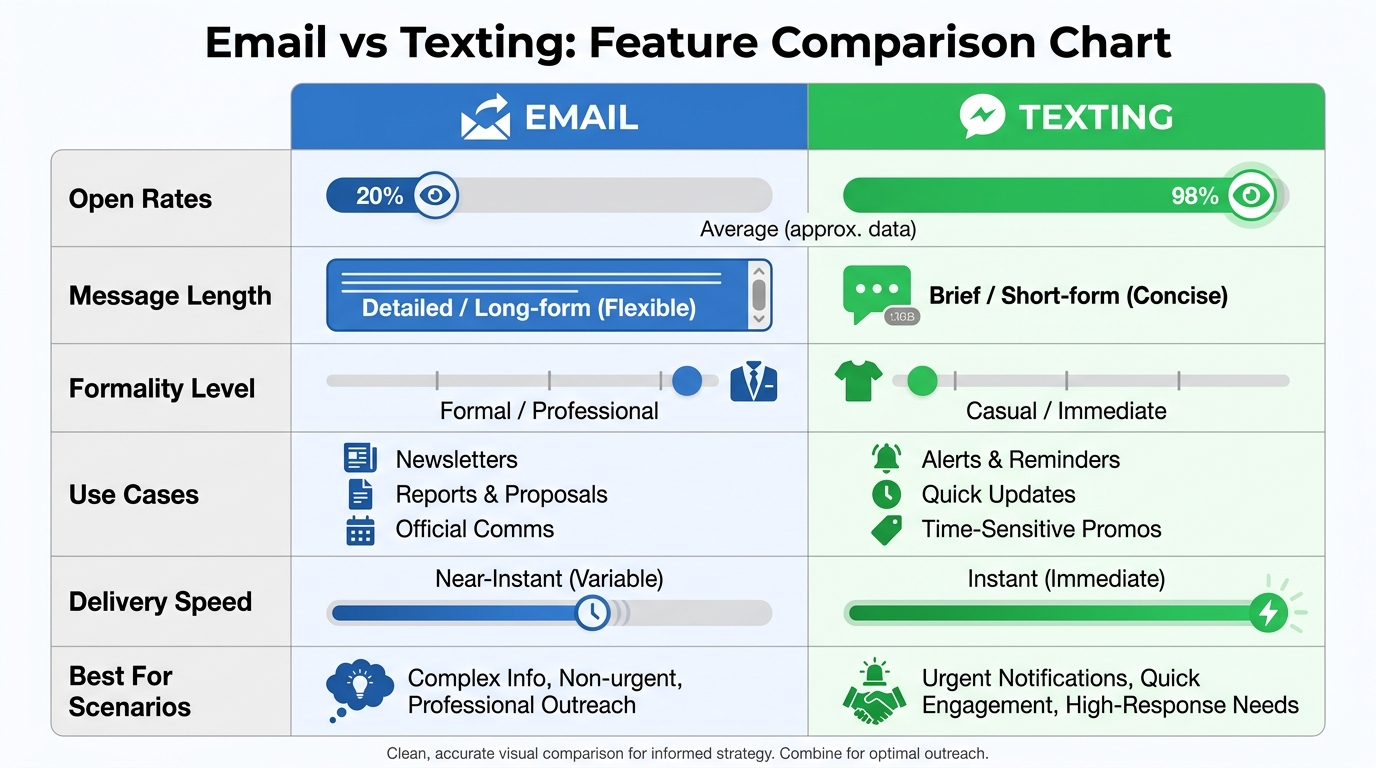
Email provides formal, detailed communication with attachments and longer messages, ideal for professional outreach and documentation. Texting offers immediate, casual communication with higher open rates (98% vs 20% for email) but limited character counts. For cold outreach campaigns, email allows personalization at scale, tracking metrics, and automated follow-ups, while texting works best for urgent notifications and existing customer relationships.
How can I automate email and texting campaigns for cold outreach?
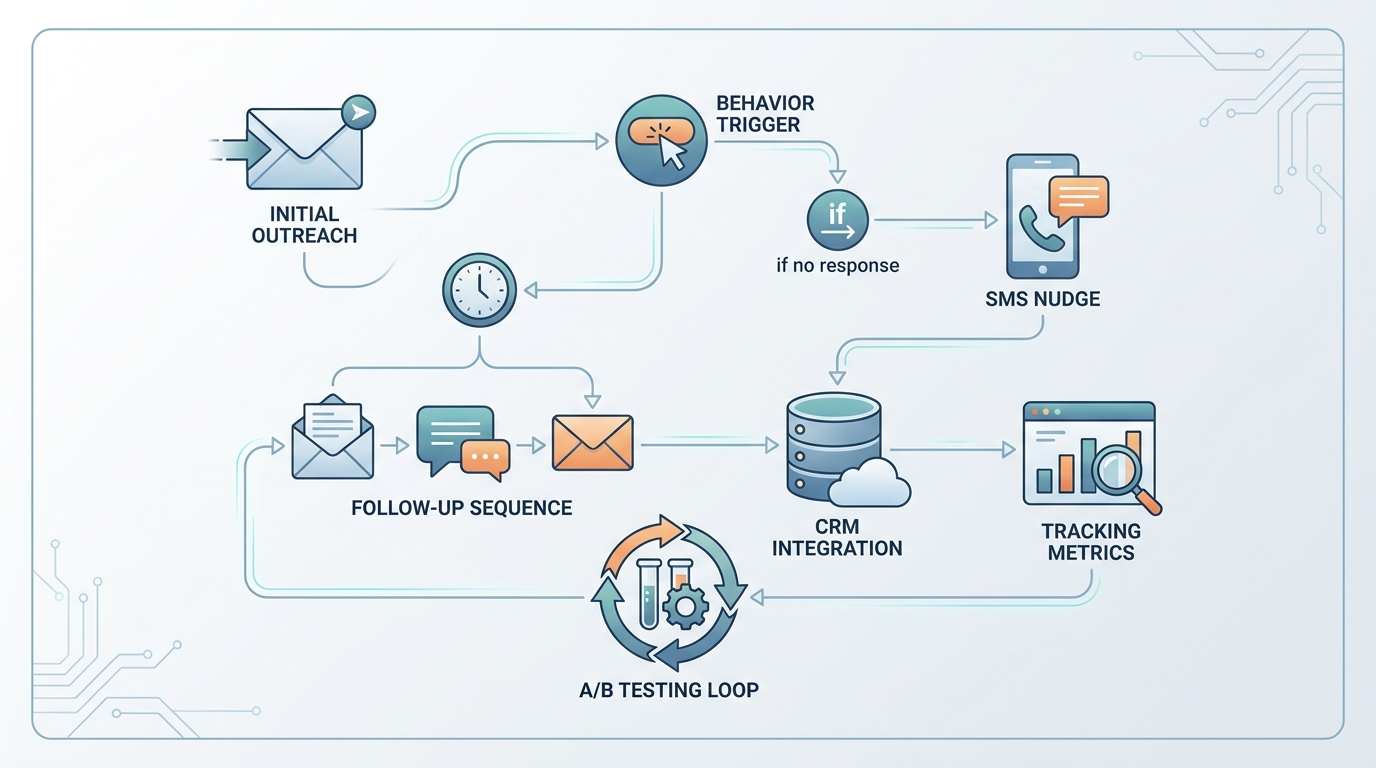
Automate cold outreach by using specialized platforms that schedule email sequences, personalize messages with merge tags, and trigger follow-ups based on recipient behavior. These tools integrate with CRM systems for inside sales teams, track open and reply rates, and manage contact lists. Advanced platforms allow A/B testing, inbox rotation, and automated warm-up to improve deliverability and boost response rates.
How do I create a Gmail email account for business outreach?
To create a Gmail account, visit gmail.com and click ‘Create account.’ Enter your name, desired email address, and secure password. Verify with a phone number and add recovery options. For business outreach, consider Google Workspace for custom domain emails, enhanced security, and professional features. Multiple Gmail accounts can be created for different outreach campaigns and managed through email automation tools.
What is the best way to personalize email and texting at scale?
Personalize at scale using merge fields for names, companies, and custom variables in your messages. Advanced techniques include dynamic content blocks, industry-specific templates, and AI-powered personalization based on prospect data. Segment your audience by demographics, behavior, or engagement levels. Use CRM data to reference specific pain points, and incorporate social proof relevant to each recipient’s industry or role.
How can I recover my Gmail email account for my outreach campaigns?
For Gmail email account recovery, visit the Google Account Recovery page and enter your email address. Use your recovery phone number or backup email to receive a verification code. Answer security questions or provide the last password you remember. Once recovered, update your security settings and enable two-factor authentication. For business accounts, contact your Google Workspace administrator for additional support.
How do email and texting integrate with CRM for inside sales teams?
CRM integration synchronizes email and texting communications with contact records, tracking all interactions automatically. Inside sales teams can send personalized campaigns directly from the CRM, log responses, and trigger workflows based on engagement. This integration provides complete visibility into prospect journeys, enables lead scoring, and helps sales reps prioritize follow-ups. Automated data sync ensures accurate reporting and eliminates manual data entry.
What are the best practices for writing effective cold emails that boost reply rates?
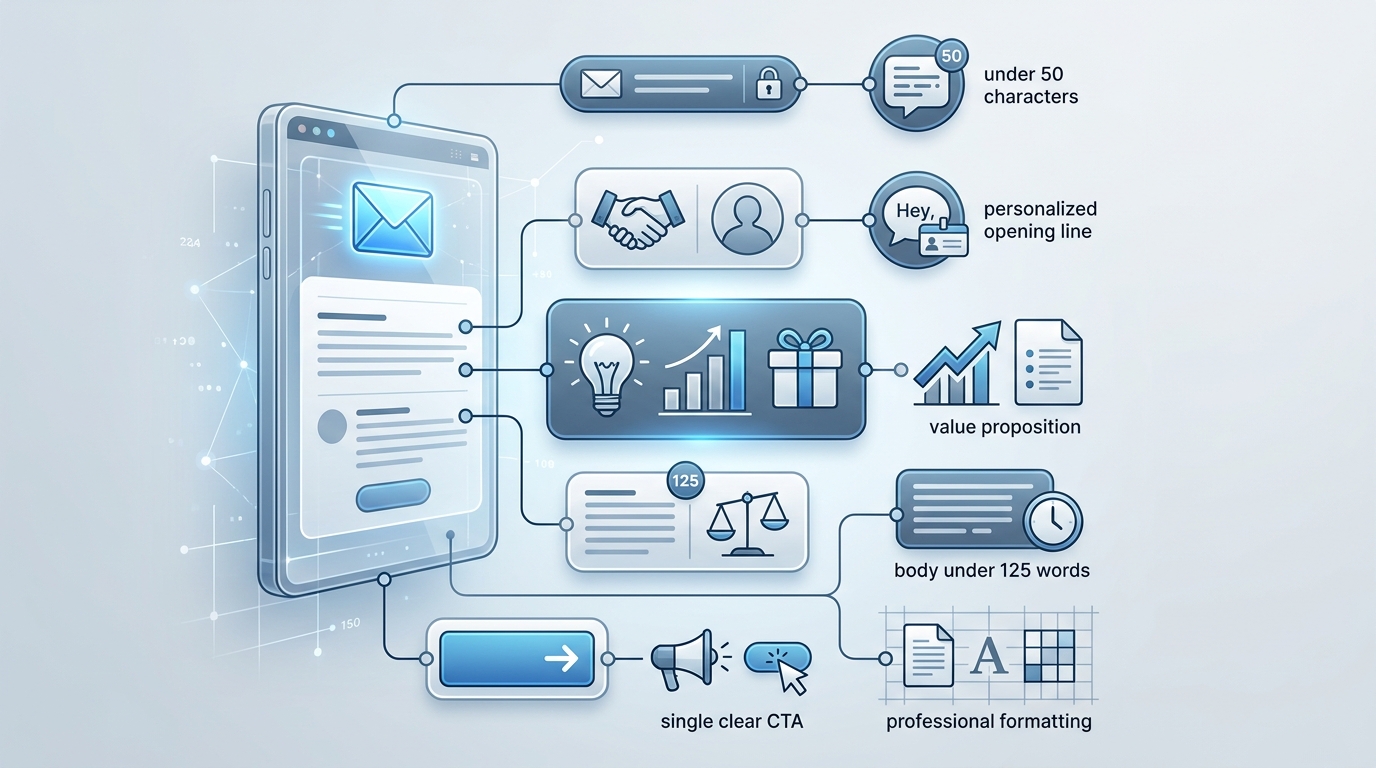
Effective cold emails have compelling subject lines (under 50 characters), personalized opening lines referencing the prospect’s work, and clear value propositions. Keep messages under 125 words, focus on the recipient’s pain points, and include one specific call-to-action. Avoid spam triggers, use professional formatting, and send from a warmed-up domain. A/B test different approaches and follow up 3-5 times with varied messaging to maximize response rates.
How do I sign in to my ATT email account to manage business communications?
To sign in to your ATT email, visit att.yahoo.com or currently.com/mail and enter your AT&T email address (ending in @att.net) and password. Click ‘Sign In’ to access your inbox. For persistent login issues, use the ‘Forgot Password’ link for account recovery. AT&T email can be accessed through webmail or configured in email clients like Outlook or Apple Mail for managing business outreach campaigns.
Understanding Email and Texting in Modern Business Communication
In today’s digital landscape, mastering both email and texting has become essential for effective business communication. Whether you’re managing customer relationships, conducting outreach campaigns, or simply staying connected with your team, understanding the nuances of these two communication channels can dramatically improve your success rate.
Email remains the cornerstone of professional communication, with billions of messages sent daily across platforms like Gmail, Yahoo, Hotmail, and domain-specific services. Meanwhile, texting has evolved from casual conversations to a powerful business tool that complements email strategies perfectly. 📧
This comprehensive guide explores everything you need to know about email and texting for business, from setting up accounts to leveraging both channels for maximum impact in your sales and marketing efforts.
Setting Up Your Email Foundation
Creating Your First Email Account
Before diving into advanced strategies, you need to establish a solid email foundation. If you’re wondering how i make new email, the process has become remarkably straightforward across all major platforms.
For those looking to gmail email account create, Google offers the most widely-used free email service with robust features. The process takes just minutes and provides access to a comprehensive suite of business tools. You can find detailed instructions in our complete Gmail setup guide.
Similarly, if you need to log into hotmail email or access my emails yahoo, both Microsoft and Yahoo provide user-friendly interfaces with strong security features. Each platform offers unique advantages depending on your specific business needs.
Professional Email Options: GoDaddy and Custom Domains
While free email services work well for personal use, professional businesses benefit significantly from custom domain emails. Understanding godaddy and email integration opens doors to branded communication that builds trust and credibility. 🎯
Custom domain emails (like yourname@yourcompany.com) offer several advantages:
- Enhanced brand recognition and professionalism
- Improved deliverability rates for outreach campaigns
- Better security and control over your communications
- Scalability as your team grows
Our comprehensive GoDaddy email setup guide walks you through the entire process of establishing professional email infrastructure for cold outreach success.
Managing Multiple Email Accounts
For those wondering about email with att net or needing to sign in for att email, AT&T provides email services for their customers with specific login procedures. Managing multiple email accounts across different providers requires organization and the right tools.
| Provider | Best For | Key Features | Storage |
|---|---|---|---|
| Gmail | General business use | Integration with Google Workspace, powerful search | 15 GB free |
| Yahoo Mail | Personal and small business | Generous storage, disposable addresses | 1 TB free |
| Hotmail/Outlook | Microsoft ecosystem users | Office integration, calendar features | 15 GB free |
| Custom Domain (GoDaddy) | Professional businesses | Brand credibility, custom addresses | Varies by plan |
| AT&T Email | AT&T customers | ISP integration, basic features | 1 GB |
Email Recovery and Account Management
Gmail Email Account Recovery Essentials
Losing access to your email account can be devastating for business operations. Understanding gmail email account recovery procedures is crucial for maintaining continuity. Google provides multiple recovery options including backup email addresses, phone numbers, and security questions.
Key recovery best practices include:
- Setting up recovery email addresses before you need them
- Keeping phone numbers updated in your account settings
- Using two-factor authentication for enhanced security
- Regularly reviewing account activity for suspicious behavior
Additionally, knowing how to withdraw Gmail email or recall it after sending can save you from embarrassing mistakes or premature communications. ⚡
Writing Professional Emails: How Can We Write Email Effectively
Understanding how can we write email that gets responses is fundamental to business success. The quality of your email writing directly impacts your open rates, reply rates, and ultimately your conversion rates.
Essential elements of effective email writing include:
- Subject lines that capture attention: Keep them under 50 characters and create curiosity
- Personalized greetings: Use the recipient’s name and relevant context
- Clear value proposition: Explain the benefit within the first two sentences
- Concise body content: Respect the reader’s time with scannable formatting
- Strong call-to-action: Make the next step obvious and easy
The best from line for cold emails can significantly impact whether your message gets opened. Testing different approaches helps identify what resonates with your specific audience.
Integrating Email with CRM for Sales Success
CRM Inside Sales: The Power of Integration
Modern crm inside sales strategies rely heavily on seamless email integration. Customer Relationship Management systems that connect with your email platforms create powerful workflows that automate follow-ups, track engagement, and provide valuable insights into prospect behavior. 📊
Benefits of CRM-email integration include:
- Automatic logging of all email communications
- Triggered follow-up sequences based on recipient actions
- Centralized contact information and interaction history
- Performance analytics and optimization insights
- Team collaboration and visibility into customer conversations
For businesses scaling their outreach efforts, understanding how to leverage cold email lead generation positions can help you build a team that maximizes these integrated systems.
Finding Contact Information for Outreach
Before you can send effective emails, you need accurate contact information. Many sales professionals wonder how to find someone’s email on Facebook and other social platforms. Several proven methods exist for ethical email discovery:
| Method | Accuracy Rate | Best Use Case | Cost |
|---|---|---|---|
| Company website contact pages | 95% | Direct business inquiries | Free |
| LinkedIn profile information | 85% | B2B professional outreach | Free/Paid |
| Email finder tools | 75-90% | Large-scale prospecting | Paid |
| Social media profiles | 60-70% | Casual networking | Free |
| Database services | 80-85% | Targeted industry lists | Paid |
The Role of Texting in Modern Business Communication
When Email and Texting Work Together
While email remains the primary channel for detailed business communication, texting has emerged as a powerful complementary tool. The combination of email and texting creates a multi-touch approach that significantly improves response rates and engagement. 📱
Strategic use cases for business texting include:
- Appointment reminders and confirmations
- Time-sensitive updates and notifications
- Quick questions requiring immediate responses
- Follow-ups to email communications
- Customer service and support inquiries
Research shows that text messages have a 98% open rate compared to email’s 20-30% average. However, texting requires permission and should be used judiciously to avoid appearing intrusive.
Best Practices for Business Texting
When incorporating texting into your communication strategy alongside email, follow these guidelines:
- Always obtain consent: Never text contacts without explicit permission
- Keep messages brief: Texts should be under 160 characters when possible
- Identify yourself clearly: Include your name and company in the first message
- Provide opt-out options: Make it easy for recipients to unsubscribe
- Time appropriately: Respect business hours and time zones
The key is understanding when each channel is most appropriate. Email works best for detailed information, proposals, and formal communications. Texting excels at quick confirmations, urgent updates, and maintaining warm relationships.
Advanced Email Strategies for Lead Generation
Cold Email Automation and Personalization
Modern cold email success requires balancing automation with personalization. Cold email automation tools enable you to reach hundreds of prospects while maintaining the personal touch that drives responses. 🚀
Key automation features that enhance email effectiveness:
- Sequence building: Create multi-touch campaigns that follow up automatically
- Variable personalization: Insert custom fields beyond just names
- A/B testing: Test subject lines, content, and sending times
- Engagement tracking: Monitor opens, clicks, and replies in real-time
- Smart scheduling: Send emails when recipients are most likely to engage
The most successful teams combine these automation capabilities with genuine personalization based on prospect research. Generic mass emails no longer work in today’s sophisticated business environment.
Email Deliverability and Reputation Management
Even perfectly written emails fail if they never reach the inbox. Understanding email deliverability factors is crucial for successful outreach campaigns. Your sender reputation determines whether your messages land in the inbox, spam folder, or get blocked entirely.
| Factor | Impact Level | How to Optimize |
|---|---|---|
| Sender authentication (SPF, DKIM, DMARC) | Critical | Configure properly with your domain provider |
| Email engagement rates | High | Send to engaged contacts, remove inactive ones |
| Spam complaint rate | High | Keep under 0.1%, provide easy unsubscribe |
| Bounce rate | Medium | Verify email addresses, clean lists regularly |
| Sending volume consistency | Medium | Warm up new domains, maintain steady volume |
Tools like email warming services help establish and maintain positive sender reputation by gradually increasing sending volume and generating positive engagement signals.
Crafting Messages That Drive Responses
Email Subject Lines and From Lines
Your email’s subject line and from line work together to determine whether recipients open your message. Studies show that 47% of email recipients decide whether to open an email based solely on the subject line, while the from line establishes immediate trust and recognition.
Effective subject line strategies include:
- Asking relevant questions that create curiosity
- Mentioning mutual connections or shared interests
- Highlighting specific value propositions
- Using personalization tokens appropriately
- Keeping length under 50 characters for mobile optimization
The from line deserves equal attention. Using your personal name rather than a company name typically generates better open rates, as people prefer communicating with individuals rather than faceless organizations.
Professional Email Etiquette and Alternatives
Professional communication extends beyond just the message content. Knowing how to express concepts like thank you for your patience with variety and authenticity helps build stronger relationships through email. 💼
Common email etiquette principles include:
- Responding within 24 hours to business emails
- Using professional greetings and closings
- Proofreading carefully before sending
- Keeping formatting clean and scannable
- Using CC and BCC appropriately
- Being mindful of tone in written communication
Remember that email lacks the vocal tone and body language of in-person communication. What seems neutral to you might read as curt or demanding to recipients. When in doubt, err on the side of warmth and clarity.
Measuring and Optimizing Email Performance
Key Email Metrics to Track
Data-driven email strategies outperform gut-feel approaches consistently. Tracking the right metrics helps you understand what’s working and where to focus optimization efforts. 📈
Essential email metrics include:
- Open rate: Percentage of recipients who open your email (benchmark: 20-30%)
- Click-through rate: Percentage who click links in your email (benchmark: 2-5%)
- Reply rate: Percentage who respond to your message (benchmark: 1-5% for cold outreach)
- Conversion rate: Percentage who take your desired action (varies by goal)
- Bounce rate: Percentage of emails that don’t reach recipients (keep under 2%)
- Unsubscribe rate: Percentage who opt out (keep under 0.5%)
Context matters when interpreting these numbers. Cold outreach campaigns naturally have lower engagement rates than emails to warm leads or existing customers. Set realistic benchmarks based on your specific situation.
A/B Testing for Continuous Improvement
The most successful email marketers never stop testing. A/B testing allows you to make data-driven decisions about every element of your emails, from subject lines to call-to-action buttons.
| Element to Test | Potential Impact | Sample Variations |
|---|---|---|
| Subject line | High (affects opens) | Question vs. statement, length, personalization |
| From name | High (affects opens) | Personal name vs. company, first name only vs. full name |
| Email length | Medium (affects replies) | Short (50-100 words) vs. medium (100-200 words) |
| Call-to-action | High (affects conversions) | Question vs. direct ask, single vs. multiple options |
| Send time | Medium (affects opens) | Morning vs. afternoon, weekday vs. weekend |
Test one variable at a time with statistically significant sample sizes. Changing multiple elements simultaneously makes it impossible to determine which change drove results.
Scaling Your Email and Texting Strategy
Building a High-Performance Outreach Team
As your email and texting strategies prove successful, scaling becomes the next challenge. Building a team that maintains quality while increasing volume requires systematic processes and the right technology stack.
Consider these scaling strategies:
- Document proven email templates and sequences
- Create standardized research and personalization processes
- Implement quality control checkpoints
- Use collaboration tools for team coordination
- Invest in training and ongoing skill development
Many growing companies benefit from exploring lead generation specialist positions to expand their outreach capacity without sacrificing personalization quality.
Integrating Email with Broader Marketing Efforts
Email and texting don’t exist in isolation. The most effective strategies integrate these channels with your broader marketing ecosystem. Cross-channel coordination amplifies results and creates cohesive customer experiences. 🎯
Integration opportunities include:
- Social media coordination: Align messaging across email and social platforms
- Content marketing synergy: Use email to distribute valuable content
- Retargeting alignment: Coordinate email sends with ad campaigns
- Event promotion: Combine email invitations with text reminders
- Customer journey mapping: Use appropriate channels at each stage
Understanding social media marketing strategies helps you create cohesive multi-channel campaigns that reinforce your message across touchpoints.
Future Trends in Email and Texting Communication
AI and Automation Advances
Artificial intelligence is transforming how businesses approach email and texting. Modern AI tools can analyze vast amounts of data to predict optimal send times, suggest personalization improvements, and even generate initial draft content that humans refine.
Emerging AI capabilities include:
- Predictive analytics for engagement likelihood
- Natural language generation for personalized content
- Sentiment analysis for response optimization
- Automated follow-up decision-making
- Real-time content optimization recommendations
However, human oversight remains crucial. AI excels at processing data and identifying patterns, but authentic relationship building still requires human judgment and emotional intelligence. ✨
Privacy Regulations and Compliance
As email and texting become more sophisticated, privacy regulations continue evolving. GDPR, CAN-SPAM, TCPA, and other regulations govern how businesses can collect and use contact information for outreach.
Compliance requirements include:
- Obtaining explicit consent before sending marketing messages
- Providing clear opt-out mechanisms in every message
- Honoring unsubscribe requests promptly
- Maintaining accurate records of consent
- Protecting personal data with appropriate security measures
Staying compliant isn’t just about avoiding penalties—it’s about building trust with your audience and maintaining your sender reputation.
Conclusion: Mastering Email and Texting for Business Success
Effective email and texting strategies form the backbone of modern business communication. From setting up professional accounts and understanding platforms like Gmail, Yahoo, and custom domains through services like GoDaddy, to crafting compelling messages that drive responses—every element contributes to your success.
The key takeaways for mastering these channels include:
- Establish professional email infrastructure with proper authentication
- Integrate email with CRM systems for inside sales efficiency
- Balance automation with genuine personalization
- Use texting strategically to complement email outreach
- Track metrics and continuously optimize based on data
- Stay compliant with privacy regulations and best practices
Whether you’re learning how can we write email effectively, managing crm inside sales processes, or scaling your outreach efforts, the fundamentals remain constant: provide value, respect your recipients’ time, and build authentic relationships through consistent, relevant communication.
Ready to transform your email outreach and generate more qualified leads? Visit Meetbound to discover how our cold email automation platform helps you personalize at scale, boost reply rates, and build powerful outreach campaigns that convert. Start automating your success today and watch your pipeline grow with intelligent, data-driven communication strategies. 🚀
Article created using IntentRank