

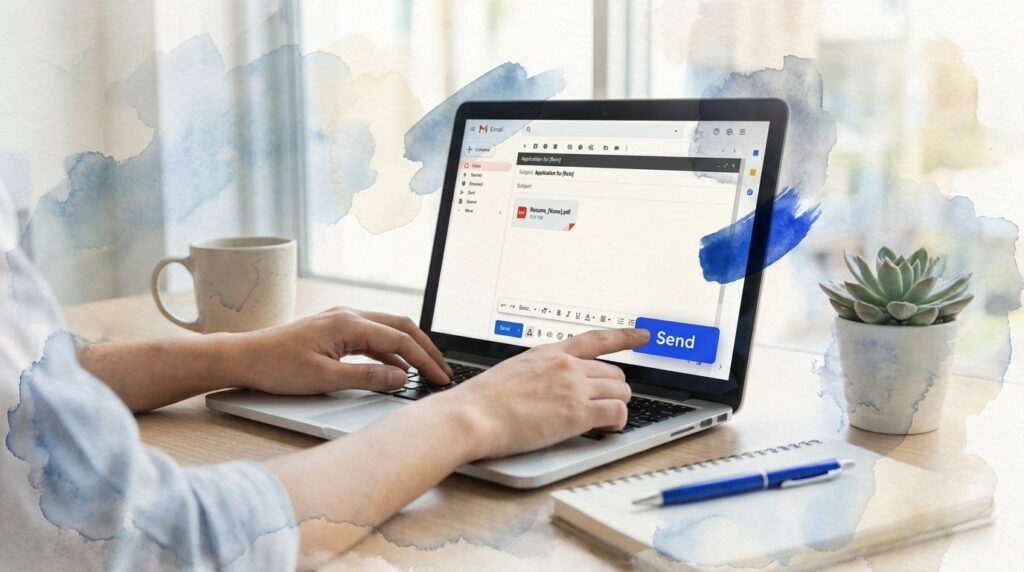
TL;DR: Sending an email with resume requires a professional subject line, personalized greeting, concise body explaining your interest and qualifications, and your resume attached as a PDF. Include a clear call-to-action, proofread carefully, and follow up within one week if you don’t receive a response to maximize your chances of landing an interview.
Frequently Asked Questions
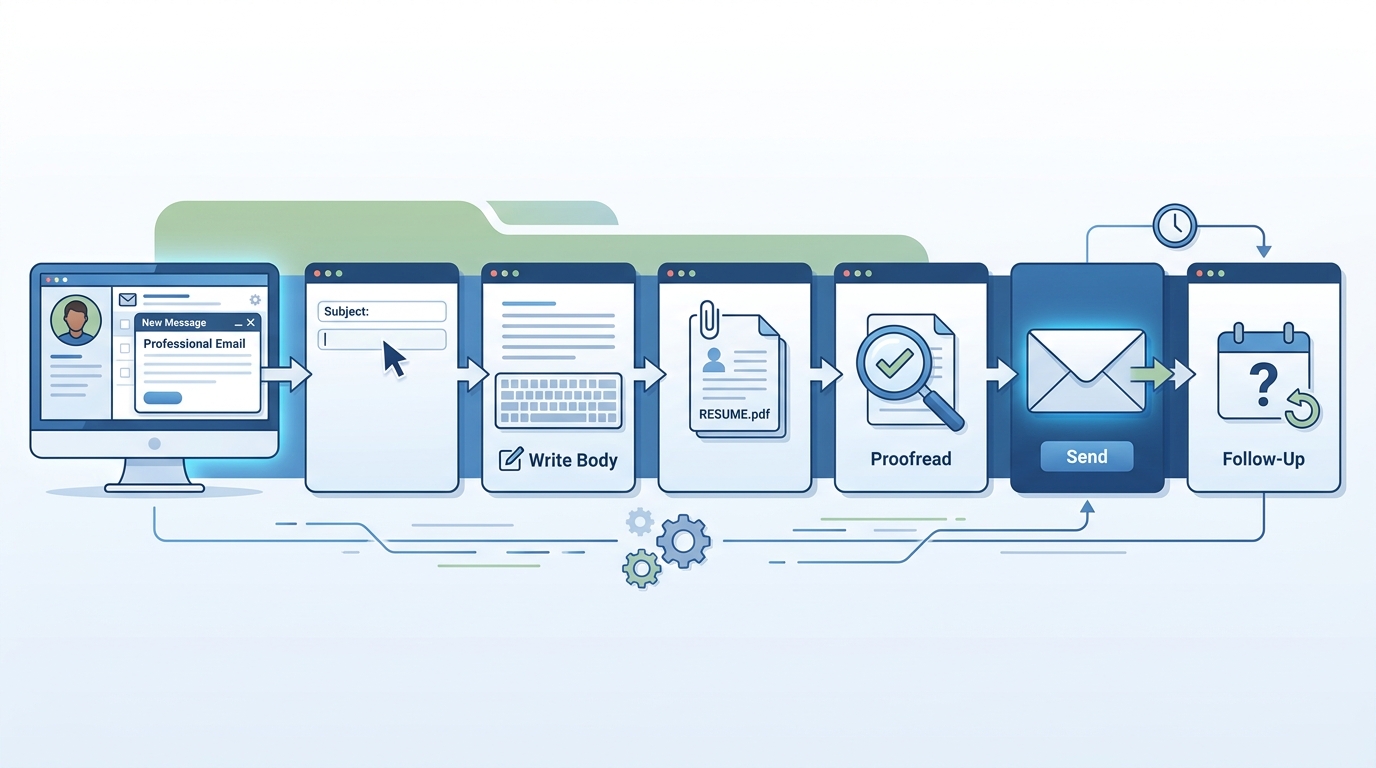
What is the best way to send an email with resume attached?
The best way is to use a professional email service like Gmail or Outlook. Compose a concise message in the body explaining your interest, attach your resume as a PDF file, write a clear subject line including the job title, and proofread before sending. Keep the email brief, professional, and personalized to the recipient.
How do I attach my resume when sending a cold email for job opportunities?
Open your email client, click the attachment icon (usually a paperclip), select your resume file from your device, and ensure it uploads successfully before sending. Name your file professionally (e.g., FirstName_LastName_Resume.pdf). Always mention the attachment in your email body and verify the file size is under 10MB for deliverability.
Should I send my resume in the email body or as an attachment?
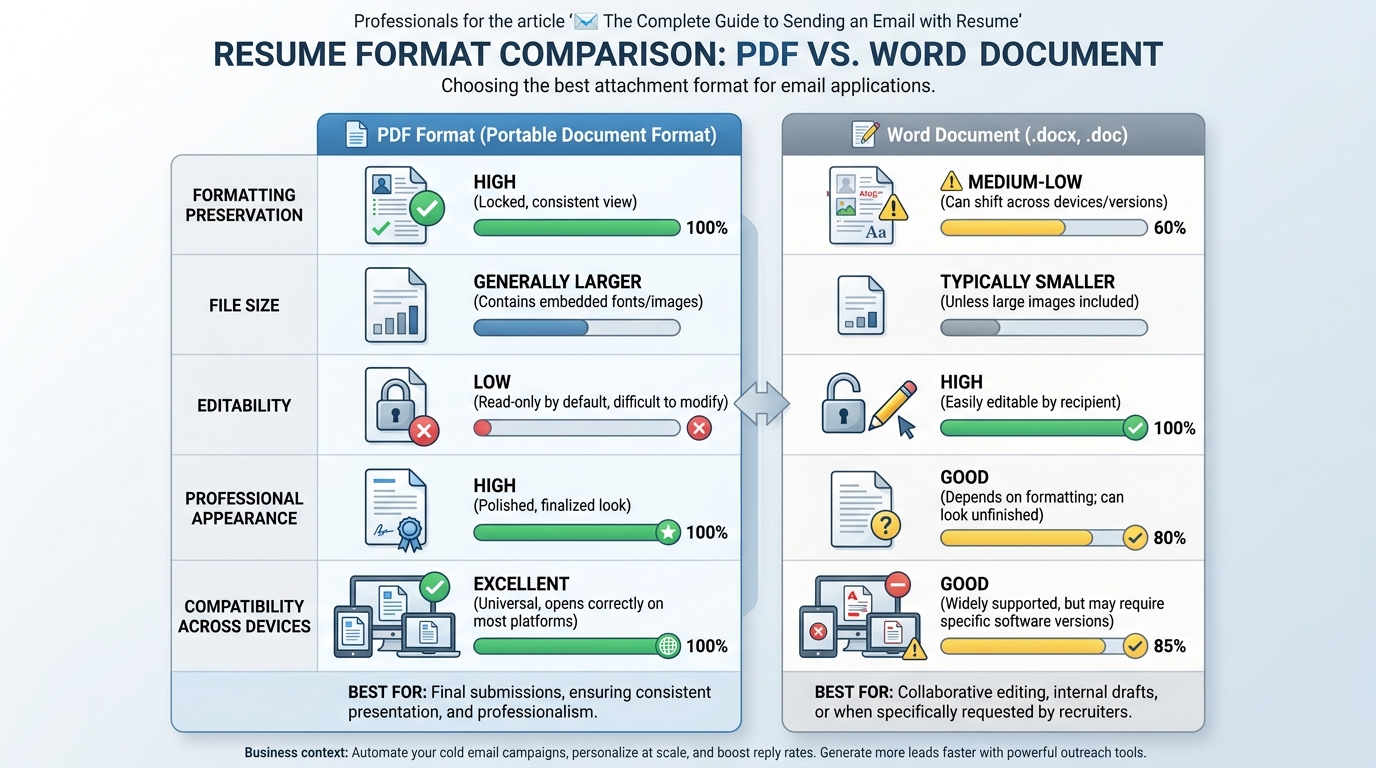
Always send your resume as an attachment in PDF format to preserve formatting. Include a brief introduction in the email body with key qualifications and mention that your detailed resume is attached. Some employers may request specific formats, so follow their instructions. PDFs are universally readable and maintain professional appearance across devices.
What email subject line should I use when sending an email with resume?
Use a clear, specific subject line that includes the job title and your name, such as ‘Marketing Manager Application – John Smith’ or ‘Resume for Sales Position – Jane Doe.’ Avoid generic subjects like ‘Resume’ or ‘Job Application.’ A descriptive subject line helps recruiters quickly identify your email and increases open rates.
Can I automate sending emails with resumes for job applications?
Yes, you can use cold email automation tools to send personalized job applications at scale. These platforms allow you to upload contact lists, customize email templates with merge tags, attach your resume, and schedule campaigns. However, ensure each email appears personalized and relevant to avoid being marked as spam by recipients.
How do I send a professional email with resume from Gmail?
Log into your Gmail account, click ‘Compose,’ enter the recipient’s email address, write a professional subject line, compose your message, click the paperclip icon to attach your resume, select the file, and click ‘Send.’ Use Gmail’s scheduling feature to send at optimal times and enable read receipts to track engagement.
What file format should I use when sending an email with resume attached?
PDF is the preferred format for sending resumes via email because it preserves formatting across all devices and operating systems. PDFs appear professional and cannot be easily edited. Avoid Word documents unless specifically requested, as formatting may change. Keep file size under 2MB and name it professionally with your name included.
How can I track if my email with resume was opened by the recipient?
Use email tracking tools integrated with cold email platforms or CRM systems to monitor opens, clicks, and replies. Many automation tools provide real-time notifications when recipients open your email or download attachments. This data helps you follow up strategically and measure your outreach campaign effectiveness for better results.
📧 The Complete Guide to Sending an Email with Resume
Sending an email with resume attached is one of the most critical steps in your job search journey. Whether you’re a sales professional looking to land a new position or a business development representative seeking better opportunities, mastering the art of the resume email can dramatically increase your chances of getting noticed by hiring managers.
In today’s competitive job market, your email is often the first impression you make on a potential employer. A well-crafted message can open doors, while a poorly written one can send your application straight to the trash folder.
This comprehensive guide will walk you through everything you need to know about sending professional resume emails, from setting up your email account to crafting the perfect message that gets responses.
🔧 Setting Up Your Professional Email Account
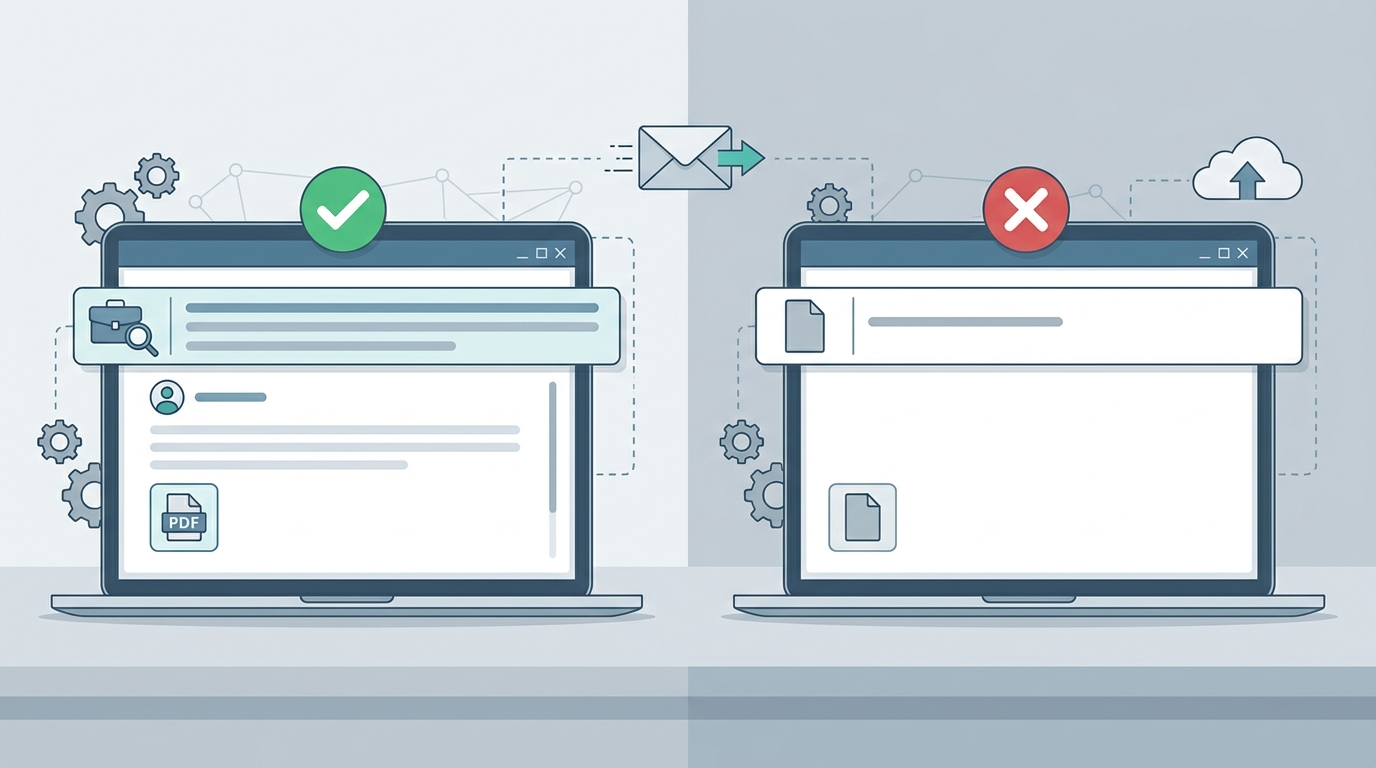
Before you start sending your resume to potential employers, you need a professional email address. Using an unprofessional email like “partyguy123@email.com” can immediately disqualify you from consideration.
Creating a Gmail Account for Job Applications
Gmail remains the most popular choice for professional communication. If you need to create a Gmail email account, the process is straightforward and takes just a few minutes.
Your professional email should follow this format:
- firstname.lastname@gmail.com
- firstinitiallastname@gmail.com
- firstname.middleinitial.lastname@gmail.com
If you’re wondering how i make new email that looks professional, keep it simple and use your real name. Avoid numbers, underscores, or creative spellings unless absolutely necessary.
Alternative Email Providers for Professional Use
While Gmail is popular, other email providers can work equally well for job applications:
| Provider | Best For | Key Features |
|---|---|---|
| Gmail | General professional use | Excellent spam filtering, integration with Google Suite |
| Outlook/Hotmail | Corporate environments | Professional appearance, Microsoft integration |
| Yahoo Mail | Long-term users | Large storage capacity, customizable interface |
| Custom Domain | Freelancers/Consultants | Maximum professionalism, brand building |
If you need to access my emails yahoo or log into hotmail email, make sure you have your credentials ready and consider enabling two-factor authentication for security.
For those interested in professional email hosting, understanding GoDaddy and email setup can help you create a custom domain email address that enhances your professional image.
✍️ How Can We Write Email That Gets Noticed
Understanding how can we write email that captures attention is crucial when sending your resume. Your email needs to stand out among dozens or hundreds of other applications.
The Perfect Email Structure
A professional resume email should follow this proven structure:
- Subject Line: Clear, specific, and professional
- Greeting: Address the hiring manager by name when possible
- Opening Paragraph: State your purpose immediately
- Body Paragraphs: Highlight your key qualifications
- Call to Action: Request an interview or next steps
- Professional Closing: Thank them and provide contact information
- Signature: Include full name, phone number, and LinkedIn profile
Subject Line Best Practices 🎯
Your subject line determines whether your email gets opened. Follow these guidelines:
- Include the job title and your name: “Marketing Manager Application – John Smith”
- Add a reference number if provided: “Application for Position #12345 – Senior Sales Rep”
- Keep it under 60 characters for mobile readability
- Avoid generic subjects like “Resume” or “Job Application”
For professionals in sales roles, understanding techniques from sales call follow up email templates can help you craft compelling subject lines that increase open rates.
📎 Attaching and Formatting Your Resume
The technical aspects of attaching your resume matter just as much as the email content itself. A poorly formatted or unreadable resume attachment wastes all your effort.
File Format Guidelines
Choose the right file format for your resume:
| Format | Advantages | Disadvantages | When to Use |
|---|---|---|---|
| Preserves formatting, universal compatibility | Harder to edit | Default choice for most applications | |
| Word (.docx) | Easy to edit, ATS-friendly | Formatting may change | When specifically requested |
| Plain Text | Maximum compatibility | No formatting | Online application systems |
File Naming Conventions
Name your resume file professionally and descriptively:
- ✅ Good: “John_Smith_Resume_2024.pdf”
- ✅ Good: “Marketing_Manager_Resume_JSmith.pdf”
- ❌ Bad: “Resume.pdf” or “MyResume_Final_v2.docx”
Keep file sizes under 5MB to ensure deliverability and quick loading times.
💼 Sample Email Templates for Sending Your Resume
Having proven templates at your disposal saves time and ensures consistency. Here are professionally crafted examples for different scenarios.
Template 1: Responding to a Job Posting
Subject: Application for Senior Sales Representative – Jane Doe
Body:
Dear [Hiring Manager Name],
I am writing to express my strong interest in the Senior Sales Representative position posted on [Job Board/Company Website]. With over five years of experience in B2B sales and a proven track record of exceeding quotas by 30%, I am confident I would be a valuable addition to your team.
In my current role at [Company Name], I have successfully managed a portfolio of 50+ enterprise clients and generated $2M in annual revenue. My expertise in consultative selling and relationship building aligns perfectly with the requirements outlined in your job description.
I have attached my resume for your review. I would welcome the opportunity to discuss how my experience and skills can contribute to [Company Name]’s continued success.
Thank you for your consideration. I look forward to hearing from you.
Best regards,
Jane Doe
(555) 123-4567
linkedin.com/in/janedoe
Template 2: Cold Email to Hiring Manager
When reaching out proactively, your approach needs to be more personalized and value-focused. This technique mirrors strategies used in B2B sales outreach.
Subject: Experienced CRM Specialist Interested in [Company Name]
Dear [Hiring Manager Name],
I recently learned about [Company Name]’s expansion into the European market and wanted to reach out regarding potential opportunities within your sales team.
As a CRM inside sales specialist with 7 years of experience implementing Salesforce solutions for mid-market companies, I have helped organizations increase their sales efficiency by an average of 40%. My background in both technical implementation and sales strategy could be particularly valuable during your growth phase.
I’ve attached my resume highlighting my relevant experience. If you have a few minutes, I’d love to learn more about your team’s goals and explore how I might contribute.
Thank you for your time and consideration.
Sincerely,
[Your Name]
Template 3: Referral Application 🤝
Subject: Referred by [Referrer Name] – Marketing Position
Dear [Hiring Manager Name],
[Referrer Name] suggested I reach out regarding the Marketing Manager opening at [Company Name]. Having worked with [Referrer Name] at [Previous Company], they thought my background in digital marketing and lead generation would be a strong fit for your team.
I have spent the past four years building and optimizing cold email campaigns that generated over 500 qualified leads per quarter. My experience with marketing automation platforms and data-driven campaign optimization has consistently delivered ROI improvements of 25-35%.
Please find my resume attached. I would appreciate the opportunity to discuss how my skills align with your needs.
Thank you for your consideration.
Best regards,
[Your Name]
🔍 Email Account Management for Job Seekers
Managing your email accounts effectively ensures you never miss important responses from potential employers.
Organizing Your Job Search Emails
Create a system to track your applications:
- Set up dedicated folders for “Applications Sent,” “Follow-ups Needed,” and “Interviews Scheduled”
- Use labels or categories to tag emails by company or position type
- Enable email notifications for your job search account
- Check your email at least twice daily during active job searching
If you need to recover access to your account, understanding Gmail email account recovery procedures can prevent you from missing critical opportunities.
Email Responsiveness Matters 📱
Being responsive to emails is crucial during your job search. Hiring managers often make quick decisions, and a delayed response can cost you an opportunity.
Best practices for email responsiveness:
- Respond to recruiter emails within 24 hours, ideally within 4-6 hours
- Set up mobile email access on your smartphone
- Create email templates for common responses to save time
- Use the “mark as unread” feature for emails requiring longer responses
If you’re applying from your phone, knowing how to add email account to iPhone ensures you can respond quickly from anywhere.
⚠️ Common Mistakes to Avoid When Sending Resume Emails
Even experienced professionals make critical errors that can derail their applications. Avoid these common pitfalls:
Technical Mistakes
- ❌ Forgetting to attach the resume (double-check before hitting send!)
- ❌ Sending from an unprofessional email address
- ❌ Using incorrect file formats or corrupted attachments
- ❌ Sending to the wrong recipient or using outdated email addresses
- ❌ Including irrelevant attachments or multiple file versions
If you accidentally send an email with errors, knowing how to withdraw Gmail email can help you recall messages within a short window.
Content Mistakes
- ❌ Generic, copy-pasted emails with no personalization
- ❌ Focusing on what you want instead of what you offer
- ❌ Including salary requirements unless specifically requested
- ❌ Writing lengthy emails (keep it under 250 words)
- ❌ Using informal language, emojis, or text speak
- ❌ Failing to proofread for typos and grammatical errors
Follow-up Mistakes
- ❌ Following up too quickly (wait at least 5-7 business days)
- ❌ Sending multiple follow-ups to the same person
- ❌ Being pushy or demanding in your tone
- ❌ Forgetting to follow up entirely
📊 Tracking Your Email Applications
Professional job seekers track their applications systematically to maximize their success rate and learn from their efforts.
Create an Application Tracking System
Build a simple spreadsheet to monitor your applications:
| Company | Position | Date Sent | Contact Name | Follow-up Date | Status | Notes |
|---|---|---|---|---|---|---|
| ABC Corp | Sales Manager | Jan 15 | Jane Smith | Jan 22 | Interview Scheduled | Phone screen on Jan 25 |
| XYZ Inc | Marketing Lead | Jan 16 | John Doe | Jan 23 | Awaiting Response | – |
For sales professionals transitioning to new roles, tools used in lead generation positions can help you organize your job search like a sales pipeline.
Metrics to Monitor 📈
Track these key performance indicators for your job search:
- Application-to-Response Rate: Aim for at least 20-30% response rate
- Response-to-Interview Rate: Target 40-50% conversion
- Average Response Time: Most responses come within 7-14 days
- Interview-to-Offer Rate: Industry average is 10-20%
If your metrics are below these benchmarks, revisit your email content and targeting strategy.
🎓 Advanced Strategies for Email Job Applications
Take your resume emails to the next level with these advanced techniques used by successful job seekers.
Personalization at Scale
When applying to multiple positions, maintain personalization while saving time:
- Research each company for 10-15 minutes before writing
- Reference specific company achievements, news, or initiatives
- Customize your value proposition for each role
- Use mail merge tools for common elements while keeping key sections unique
The balance between efficiency and personalization mirrors strategies in email and texting outreach, where automation meets customization.
Leveraging Social Media for Email Discovery 🔎
Finding the right person’s email address can significantly improve your response rate. Techniques from finding someone’s email on Facebook can help you locate hiring managers directly.
Additional methods for finding contact information:
- Check the company website’s team or leadership pages
- Use LinkedIn to identify hiring managers and find their email patterns
- Look for email signatures in company blog posts or press releases
- Use professional email finder tools like Hunter.io or RocketReach
Understanding how to change email on LinkedIn also ensures your professional profile displays your current, professional email address.
Timing Your Email Submissions ⏰
When you send your email can impact its effectiveness:
| Best Times | Worst Times | Reasoning |
|---|---|---|
| Tuesday-Thursday, 10am-11am | Monday mornings, Friday afternoons | Hiring managers are settled but not overwhelmed |
| Early afternoon (1pm-3pm) | After 6pm or weekends | Post-lunch inbox check, shows respect for boundaries |
| Mid-month | End of quarter | Less competing priorities |
🔐 Email Security and Professionalism
Protecting your email account and maintaining security demonstrates professionalism to potential employers.
Security Best Practices
- Enable two-factor authentication on all email accounts
- Use strong, unique passwords for your professional email
- Avoid accessing your email on public Wi-Fi without a VPN
- Regularly update your password every 3-6 months
- Be cautious of phishing attempts disguised as job offers
Whether you sign in for att email or use another provider, maintaining account security protects your professional reputation and personal information.
Professional Email Etiquette
Follow these etiquette guidelines for all job-related correspondence:
- Respond promptly: Within 24 hours for all job-related emails
- Use proper grammar: Proofread every message before sending
- Maintain formality: Use professional language until invited to be casual
- Include complete signatures: Full name, phone, and relevant links
- Respect boundaries: Don’t email outside business hours unless urgent
📧 Managing Multiple Email Accounts
Many job seekers maintain separate email accounts for different purposes. Understanding how do you create a group email can help you organize communications efficiently.
Email Account Strategy
Consider this multi-account approach:
- Primary Professional: firstname.lastname@gmail.com for applications
- Networking: Separate account for LinkedIn and professional networking
- Job Boards: Dedicated account for job board notifications
- Personal: Keep completely separate from job search activities
If you need to organize team communications or group applications, learning how do you make a group email on Gmail can streamline your outreach efforts.
Managing Email Subscriptions 📬
Keep your inbox clean and focused during your job search:
- Unsubscribe from promotional emails that clutter your inbox
- Use filters to automatically organize incoming messages
- Create rules to flag emails from recruiters or companies you’ve applied to
- Understand how to stop email from LinkedIn if notifications become overwhelming
💡 Leveraging CRM Tools for Your Job Search
Sales professionals and business development representatives can apply their existing skills to job searching by treating it like a sales pipeline.
CRM Inside Sales Techniques for Job Hunting
Apply crm inside sales methodologies to your job search:
- Lead Generation: Identify target companies and roles
- Qualification: Research company culture and requirements
- Outreach: Send personalized resume emails
- Follow-up: Nurture relationships with hiring managers
- Closing: Negotiate offers and finalize terms
This systematic approach increases your success rate and keeps you organized throughout the process.
Tools to Enhance Your Email Job Search
| Tool Type | Purpose | Examples |
|---|---|---|
| Email Tracking | See when emails are opened | Mailtrack, HubSpot Email Tracking |
| Template Management | Save and customize email templates | Gmail Templates, TextExpander |
| Contact Management | Track applications and contacts | Airtable, Notion, Google Sheets |
| Email Scheduling | Send emails at optimal times | Boomerang, Gmail Scheduled Send |
🚀 Following Up After Sending Your Resume
The follow-up email is where many job seekers either win or lose opportunities. Strategic follow-up demonstrates persistence without being pushy.
The Perfect Follow-Up Timeline
- Day 1: Send initial application with resume
- Day 5-7: First follow-up if no response
- Day 12-14: Second follow-up if still no response
- Day 21: Final follow-up before moving on
Follow-Up Email Template
Subject: Following Up: Marketing Manager Application – [Your Name]
Dear [Hiring Manager Name],
I wanted to follow up on my application for the Marketing Manager position I submitted on [Date]. I remain very interested in this opportunity and believe my experience in lead generation and campaign optimization would be valuable to your team.
I understand you’re likely reviewing many applications. If you need any additional information or would like to schedule a brief call to discuss my qualifications, I’m happy to accommodate your schedule.
Thank you for your consideration.
Best regards,
[Your Name]
Techniques from sales call follow up emails can help you craft compelling follow-up messages that get responses without seeming desperate.
🎯 Optimizing Your Email Strategy for Different Industries
Different industries have varying expectations for email communication. Tailor your approach accordingly.
Tech Industry Email Approach
- Keep emails concise and data-driven
- Highlight technical skills and measurable achievements
- Link to your GitHub, portfolio, or relevant projects
- Use modern, clean email formatting
Sales and Marketing Roles 💼
- Demonstrate your communication skills through your email
- Include specific metrics and results
- Show understanding of the company’s market position
- Reference successful campaigns or strategies you’ve implemented
Creative Industries
- Show personality while maintaining professionalism
- Link to your portfolio prominently
- Use visual elements appropriately (but don’t overdo it)
- Demonstrate knowledge of the company’s creative work
Corporate and Finance
- Maintain formal, conservative tone
- Focus on qualifications and credentials
- Emphasize stability and track record
- Keep formatting traditional and clean
📱 Mobile Email Optimization for Job Applications
With over 50% of emails now opened on mobile devices, ensuring your resume email looks good on smartphones is critical.
Mobile-Friendly Email Checklist
- ✅ Keep subject lines under 40 characters for mobile displays
- ✅ Use short paragraphs (2-3 sentences maximum)
- ✅ Ensure attachments are mobile-viewable (PDF works best)
- ✅ Test your email on both iPhone and Android before sending
- ✅ Use a responsive email signature that displays correctly on mobile
- ✅ Avoid complex formatting that may break on smaller screens
Understanding how to configure email across devices, like knowing how to send email with ATT net, ensures your messages reach recipients regardless of their email provider or device.
🌟 Building Relationships Beyond the Resume Email
The most successful job seekers understand that sending a resume email is just the beginning of building a professional relationship.
Networking Through Email
Expand your opportunities by:
- Connecting with employees at target companies before applying
- Requesting informational interviews to learn about roles
- Sharing relevant industry content with hiring managers
- Joining professional email lists and contributing value
- Following up periodically even after rejection to stay on their radar
Converting Email Connections to Opportunities
Transform email conversations into job offers:
- Respond thoughtfully to all communications, even rejections
- Ask for feedback when possible to improve future applications
- Request to be considered for future openings
- Maintain connections through LinkedIn and periodic check-ins
- Offer value by sharing relevant articles or insights
🎓 Real-World Examples and Success Stories
Learning from successful email campaigns can dramatically improve your results.
Case Study: The Personalized Approach
Situation: Marketing professional applying to a competitive role at a tech startup.
Strategy: Researched the company’s recent product launch, identified the hiring manager on LinkedIn, and crafted an email demonstrating specific knowledge of their challenges.
Result: Received interview request within 48 hours. The hiring manager mentioned the personalized approach stood out among 200+ applications.
Case Study: The Value-First Email
Situation: Sales representative transitioning to a new industry.
Strategy: Instead of just sending a resume, included a brief analysis of the company’s sales process with suggestions for improvement.
Result: Hiring manager was impressed by the proactive approach and scheduled an interview to discuss ideas further.
🔄 Continuous Improvement of Your Email Strategy
Treat your job search like a campaign that requires testing and optimization.
A/B Testing Your Emails
Test these variables to improve performance:
| Element | Version A | Version B | Metric to Track |
|---|---|---|---|
| Subject Line | Direct approach | Question-based | Open rate |
| Email Length | 150 words | 250 words | Response rate |
| Opening Line | About you | About them | Interview requests |
| Call to Action | Request interview | Request call | Conversion rate |
Learning from Rejections
Every “no” provides valuable data:
- Track which emails get responses versus silence
- Note which subject lines generate opens
- Identify patterns in successful versus unsuccessful applications
- Request feedback when appropriate
- Adjust your approach based on results
🎯 Ready to Transform Your Job Search?
Sending an email with resume effectively is both an art and a science. By following the strategies outlined in this guide, you’ll significantly increase your chances of landing interviews and ultimately securing your ideal position.
Remember these key takeaways:
- ✅ Use a professional email address and maintain proper account security
- ✅ Personalize every email with specific research about the company
- ✅ Keep your message concise, focused, and value-oriented
- ✅ Format your resume properly and use professional file naming
- ✅ Follow up strategically without being pushy
- ✅ Track your metrics and continuously improve your approach
- ✅ Leverage tools and automation while maintaining authenticity
The same principles that drive successful cold email campaigns in sales apply to job searching. Just as businesses need effective outreach strategies to generate leads, job seekers need systematic email approaches to land opportunities.
If you’re looking to take your email outreach to the next level—whether for job applications or business development—visit Meetbound to discover how automation and personalization can work together to boost your response rates and achieve your goals faster. Our powerful tools help you automate campaigns, personalize at scale, and generate more opportunities than ever before. 🚀
Article created using IntentRank