
TL;DR: To access my emails Yahoo, go to mail.yahoo.com and sign in with your Yahoo ID and password. Once logged in, you can read, compose, organize, and manage your emails through the Yahoo Mail interface. The platform offers free email service with spam protection, customizable folders, and mobile app access for convenient communication.
Frequently Asked Questions
How do I access my emails on Yahoo?
To access your Yahoo emails, go to mail.yahoo.com and enter your Yahoo email address and password. Click ‘Sign in’ to view your inbox. You can also download the Yahoo Mail app on mobile devices for convenient access. If you’ve forgotten your password, use the ‘Forgot password’ link to recover your account through email or phone verification.
What is the difference between Yahoo email and ATT.net email?
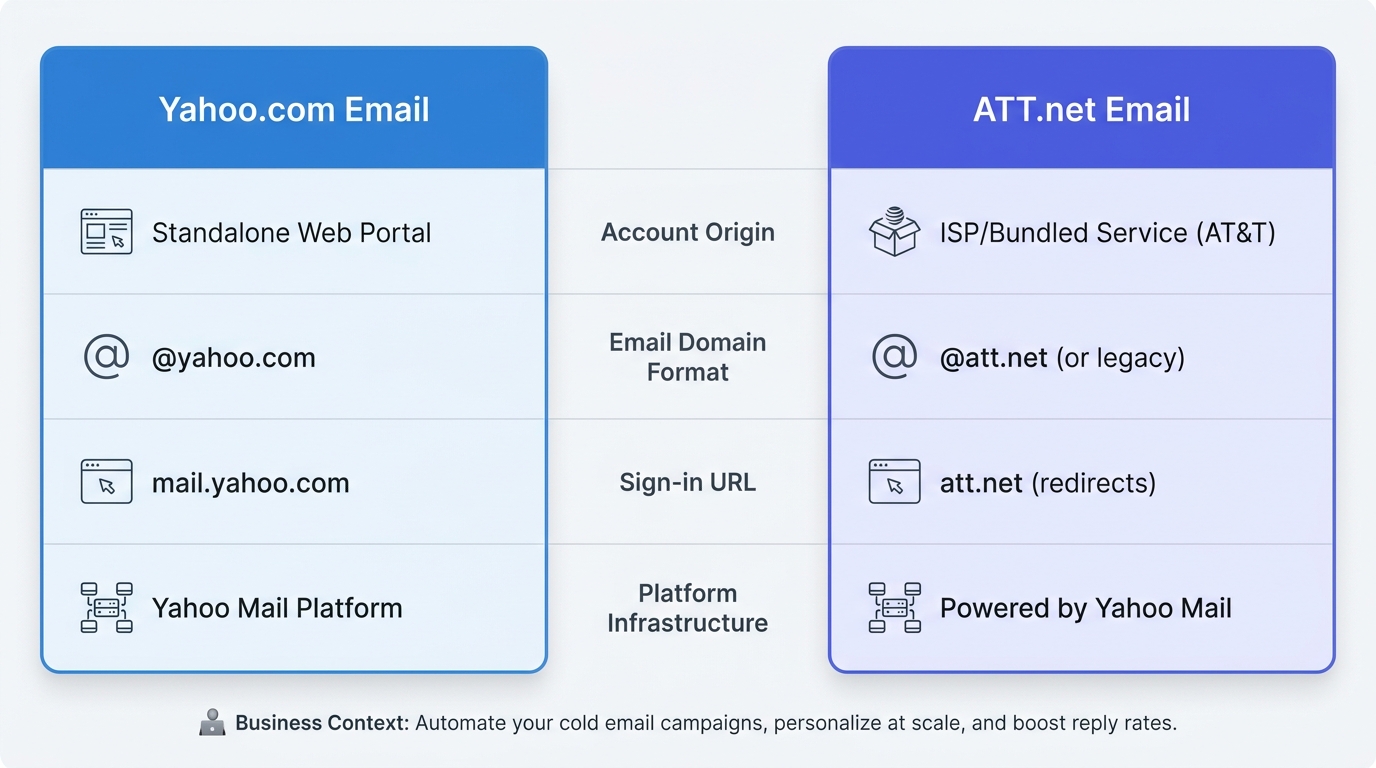
ATT.net email accounts were originally provided by AT&T but are now managed through Yahoo Mail infrastructure. While Yahoo.com emails are standard Yahoo accounts, ATT.net addresses are specific to AT&T customers. Both use the same Yahoo Mail platform for access, meaning you can sign in for ATT email through the Yahoo Mail interface at mail.yahoo.com using your full @att.net address.
How can I set up my Yahoo email for business cold email campaigns?
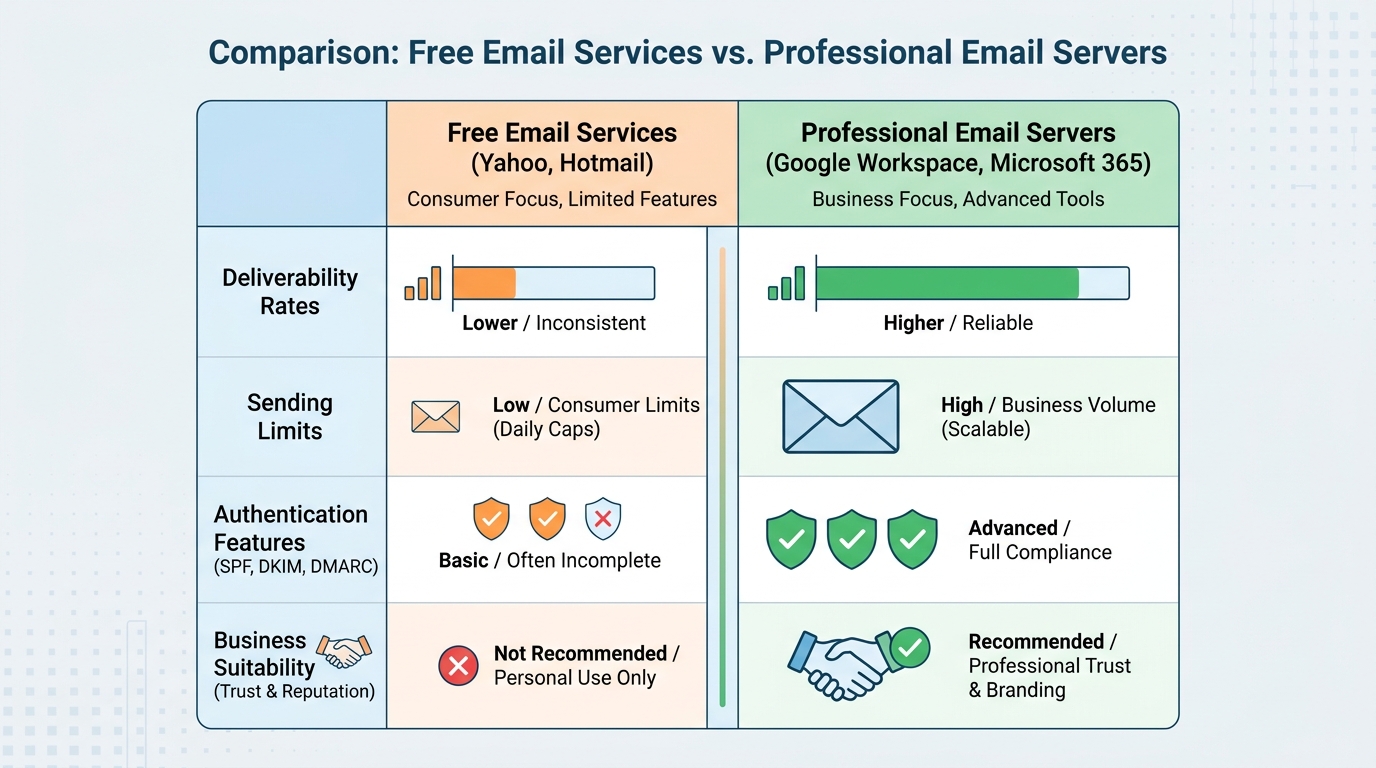
Yahoo email has limitations for cold email campaigns, including daily sending limits and potential deliverability issues. For business outreach, use dedicated cold email platforms that integrate with professional email servers. These tools offer automation, personalization at scale, tracking, and better inbox placement rates. Configure proper authentication (SPF, DKIM, DMARC) and warm up your domain before launching campaigns to maximize reply rates.
Can I use Yahoo Mail with a custom domain like GoDaddy?
Yahoo Mail doesn’t directly support custom domain hosting. However, you can forward emails from your GoDaddy domain to your Yahoo account or use Yahoo Mail to send emails from your custom domain address. For professional email with custom domains, consider using GoDaddy’s email hosting service or business email providers that offer better integration, deliverability, and features for business communication.
How do I recover my Yahoo email account if I can’t log in?
To recover your Yahoo email account, visit the Yahoo sign-in page and click ‘Forgot username or password.’ Enter your email address or phone number, then follow the verification steps. Yahoo will send a recovery code via text, call, or alternate email. Once verified, you can reset your password. Keep your recovery information updated to ensure smooth account recovery in the future.
What are the best email servers for business cold outreach campaigns?
Professional email servers for business outreach include Google Workspace, Microsoft 365, and dedicated SMTP providers. These offer better deliverability, higher sending limits, and advanced authentication compared to free services like Yahoo or Hotmail. Cold email platforms integrate with these servers to automate campaigns, personalize messages at scale, track engagement, and manage CRM for inside sales teams while maintaining inbox placement.
How do I create a new email account for professional use?
To create a professional email account, choose a business email provider like Gmail (Google Workspace), Microsoft 365, or a custom domain service. Visit the provider’s website, click ‘Create account,’ enter your desired email address, create a strong password, and provide required information. For cold email campaigns, use a custom domain email rather than free services to improve credibility and deliverability rates.
What should I write in a cold email to boost reply rates?
Effective cold emails include a personalized subject line, brief introduction showing research about the recipient, clear value proposition addressing their pain points, and a specific call-to-action. Keep emails under 100 words, avoid spam triggers, and send from a professional domain. Use cold email automation tools to personalize at scale, A/B test subject lines, and track engagement metrics to optimize campaigns for higher reply rates.
Understanding My Emails Yahoo: Your Complete Guide to Yahoo Mail Management
Managing my emails yahoo effectively has become essential in today’s digital landscape, whether you’re handling personal correspondence or running business outreach campaigns. Yahoo Mail remains one of the most popular email platforms globally, serving millions of users who need reliable communication tools for everything from casual messaging to professional sales outreach.
Yahoo Mail offers a robust platform that competes with other major email services, providing features that can streamline your communication workflow. Understanding how to maximize your Yahoo email experience will help you stay organized, secure, and productive in both personal and professional contexts.
This comprehensive guide will walk you through everything you need to know about managing your Yahoo emails, from basic setup to advanced features, security best practices, and integration with business tools. Whether you’re new to Yahoo Mail or looking to optimize your existing account, you’ll find actionable insights to enhance your email management strategy. 📧
Getting Started with Yahoo Mail: Account Creation and Setup
Creating a Yahoo email account is straightforward and takes just a few minutes. The process is similar to gmail email account create procedures, but with Yahoo’s unique interface and features.
Step-by-Step Yahoo Account Creation
Setting up your Yahoo Mail account requires basic personal information and a few security measures to protect your account. Here’s what you need to know:
- Visit Yahoo’s signup page: Navigate to mail.yahoo.com and click “Create Account”
- Enter personal information: Provide your name, desired email address, password, and phone number
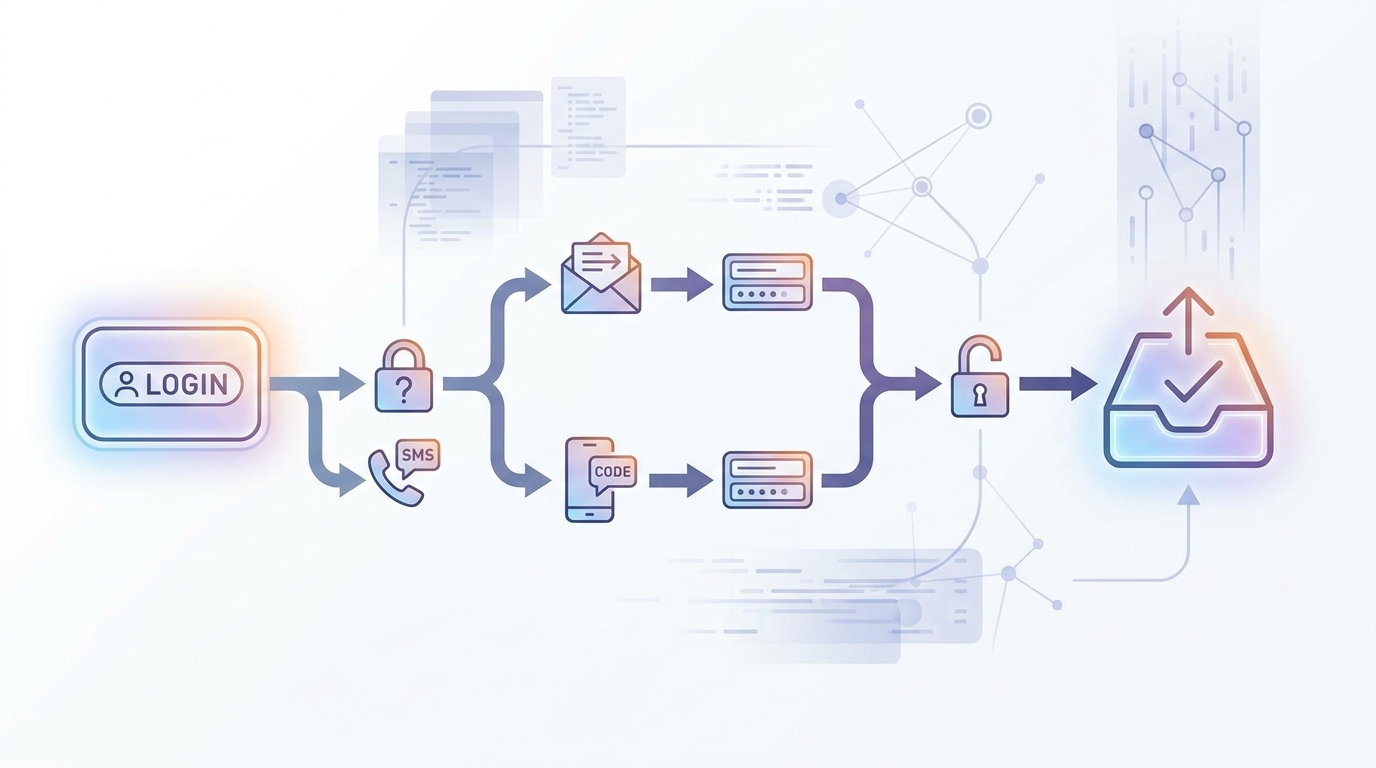
- Verify your identity: Yahoo will send a verification code to your mobile device
- Complete security setup: Add recovery options and security questions
- Customize your settings: Configure your inbox layout and notification preferences
The setup process mirrors what you’d experience when learning how i make new email accounts on other platforms, but Yahoo offers unique customization options that can enhance your email experience from day one.
Choosing the Right Yahoo Email Plan
Yahoo offers both free and premium email options. Understanding the differences helps you select the best plan for your needs:
| Feature | Yahoo Mail Free | Yahoo Mail Pro |
|---|---|---|
| Storage | 1TB | Unlimited |
| Ads | Yes | No |
| Customer Support | Basic | Priority |
| Mobile App Features | Standard | Enhanced |
| Price | Free | $4.99/month |
For business users conducting cold outreach campaigns, the premium version provides an ad-free experience that projects greater professionalism when communicating with prospects. 💼
Accessing My Emails Yahoo: Sign-In Methods and Troubleshooting
Accessing your Yahoo email should be seamless, but understanding the various sign-in methods and troubleshooting common issues ensures you’re never locked out of important communications.
Standard Sign-In Process
The basic Yahoo Mail sign-in process is straightforward, similar to how you would log into hotmail email or other email platforms:
- Navigate to mail.yahoo.com or yahoo.com
- Click the “Sign In” button in the top right corner
- Enter your Yahoo email address or username
- Input your password
- Click “Sign In” to access your inbox
If you’re managing multiple email accounts, including email with att net or other providers, consider using a password manager to securely store your credentials and streamline the sign-in process across platforms.
Two-Factor Authentication for Enhanced Security
Enabling two-factor authentication (2FA) adds an extra layer of security to your Yahoo account. This is particularly important for business users who handle sensitive client information or conduct outreach campaigns through their Yahoo email.
To enable 2FA on your Yahoo account:
- Sign in to your Yahoo account
- Click your profile icon and select “Account Info”
- Navigate to “Account Security”
- Select “Two-step verification” and follow the setup wizard
- Choose your preferred verification method (SMS, authenticator app, or security key)
Account Recovery Options
If you’re locked out of your Yahoo account, the recovery process is similar to gmail email account recovery procedures. Yahoo offers multiple recovery methods:
- Phone number verification: Receive a code via SMS to your registered mobile number
- Recovery email: Get a reset link sent to your alternate email address
- Security questions: Answer your pre-set security questions to verify identity
- Account key: Use the Yahoo Account Key feature for passwordless authentication
Always keep your recovery information up to date to avoid access issues. For business users managing crm inside sales activities, losing access to your email account can mean missing critical follow-ups with prospects. 🔐
Mastering Yahoo Mail Features for Professional Communication
Yahoo Mail offers numerous features that can enhance your email management, especially when conducting professional outreach or managing business communications.
Organizing Your Yahoo Inbox
Effective inbox organization is crucial for maintaining productivity. Yahoo Mail provides several tools to help you stay organized:
- Folders: Create custom folders to categorize emails by project, client, or priority
- Filters: Set up automatic rules to sort incoming emails based on sender, subject, or keywords
- Stars and flags: Mark important emails for quick reference and follow-up
- Smart Views: Yahoo’s AI-powered feature automatically groups similar emails together
These organizational tools are particularly valuable when you’re learning how can we write email campaigns at scale and need to track responses efficiently.
Composing Professional Emails in Yahoo
Creating compelling emails that get responses requires attention to detail. Yahoo Mail’s composition tools include:
| Feature | Purpose | Best Use Case |
|---|---|---|
| Rich Text Formatting | Style your emails with fonts, colors, and formatting | Professional presentations and proposals |
| Templates | Save frequently used email formats | Cold outreach and follow-up sequences |
| Attachments | Include files up to 25MB | Sending documents and presentations |
| Scheduled Sending | Set emails to send at optimal times | Time-zone optimization for global outreach |
| Read Receipts | Track when recipients open your emails | Following up on important messages |
For sales professionals, understanding these features helps you craft messages that resonate with prospects, similar to the strategies outlined in best sales call follow up email templates. ✍️
Managing Email Contacts and Groups
Yahoo Mail’s contact management system allows you to organize your network effectively. This is essential when you need to understand how do you create a group email for team communications or bulk outreach:
- Add contacts manually or import from other platforms
- Create contact lists for different audience segments
- Add notes and custom fields to contact records
- Sync contacts across devices for seamless access
- Export contacts for backup or migration purposes
Proper contact management becomes increasingly important as your network grows, especially for crm inside sales professionals who need to track multiple prospect relationships simultaneously.
Yahoo Mail Security: Protecting Your Email Account
Security should be a top priority when managing my emails yahoo, particularly if you’re using your account for business purposes or handling sensitive information.
Essential Security Practices
Implementing these security measures will significantly reduce your risk of account compromise:
- Use a strong, unique password: Combine uppercase, lowercase, numbers, and special characters
- Enable two-factor authentication: Add an extra verification step to prevent unauthorized access
- Review account activity regularly: Check your recent activity log for suspicious sign-ins
- Be cautious with third-party apps: Only grant access to trusted applications
- Avoid public Wi-Fi for sensitive emails: Use a VPN when accessing email on public networks
These practices apply whether you’re managing Yahoo Mail, learning how to sign in for att email, or maintaining multiple email accounts across different platforms. 🛡️
Recognizing and Avoiding Email Scams
Yahoo users, like those on all email platforms, face various phishing and scam attempts. Here’s how to protect yourself:
- Verify sender addresses carefully before clicking links
- Hover over links to preview destinations before clicking
- Be skeptical of urgent requests for personal information
- Don’t open attachments from unknown senders
- Report suspicious emails using Yahoo’s built-in reporting tools
Managing Email Privacy Settings
Yahoo provides granular privacy controls that let you determine how your information is used and who can contact you:
| Privacy Setting | Options | Recommendation |
|---|---|---|
| Email Forwarding | Enable/Disable automatic forwarding | Disable unless specifically needed |
| Read Receipts | Always send, ask first, never send | Set to “ask first” for control |
| Contact Visibility | Public, contacts only, private | Set to “contacts only” or “private” |
| Data Collection | Opt in/out of personalization | Review and adjust based on comfort level |
Integrating Yahoo Mail with Business Tools and Workflows
For professionals using Yahoo Mail for business communications, integration with other tools can significantly enhance productivity and streamline workflows.
Mobile Access and Synchronization
The Yahoo Mail mobile app provides full-featured access to your inbox on the go. Setting it up is similar to learning how to add email account to iPhone:
- Download the Yahoo Mail app from the App Store or Google Play
- Sign in with your Yahoo credentials
- Enable push notifications for real-time email alerts
- Configure swipe actions for quick email management
- Set up multiple accounts if you manage various email addresses
Mobile access is crucial for B2B sales reps who need to respond quickly to prospect inquiries while traveling or working remotely. 📱
Connecting Yahoo Mail to Email Clients
You can access Yahoo Mail through desktop email clients like Outlook, Thunderbird, or Apple Mail. This is particularly useful if you’re managing multiple accounts, including godaddy and email accounts or other business email services.
To connect Yahoo Mail to a third-party client, you’ll need to:
- Generate an app-specific password in your Yahoo account settings
- Configure your email client with Yahoo’s IMAP or POP settings
- Use the app password instead of your regular Yahoo password
- Test the connection to ensure emails sync properly
Yahoo Mail for Business Communications
While Yahoo Mail is primarily a consumer email service, many professionals use it for business purposes. However, understanding the limitations compared to dedicated email server for business solutions is important:
| Consideration | Yahoo Mail | Business Email Services |
|---|---|---|
| Custom Domain | Not available | Your-company.com addresses |
| Professional Appearance | Consumer-focused | Business-oriented branding |
| Integration Options | Limited | Extensive CRM and tool integrations |
| Support Level | Basic (Pro: Priority) | Dedicated business support |
| Cost | Free or $4.99/month | Varies by provider and features |
For serious business outreach, consider whether Yahoo Mail meets your needs or if a dedicated business email solution would better serve your goals. 💡
Advanced Yahoo Mail Tips for Power Users
Once you’ve mastered the basics of managing my emails yahoo, these advanced techniques can further optimize your email workflow.
Keyboard Shortcuts for Faster Email Management
Yahoo Mail supports numerous keyboard shortcuts that can dramatically speed up your email processing:
- C: Compose a new email
- R: Reply to the selected email
- A: Reply all
- F: Forward the selected email
- Delete: Move email to trash
- N: Navigate to the next email
- P: Navigate to the previous email
- S: Star or unstar an email
Mastering these shortcuts helps you process emails more efficiently, which is essential when managing high volumes of correspondence or following the strategies in how to be more responsive to emails. ⚡
Using Yahoo Mail Search Effectively
Yahoo Mail’s search function is powerful when you understand how to use advanced operators:
- from: Find emails from specific senders (from:john@example.com)
- to: Search emails sent to specific recipients
- subject: Search within email subject lines
- has:attachment: Find all emails with attachments
- before: and after: Search by date ranges
Effective search capabilities become increasingly valuable as your email archive grows, helping you quickly locate important conversations or reference materials.
Email Management Best Practices
Implementing these best practices will help you maintain an organized, efficient inbox:
- Process emails in batches: Set specific times for checking email rather than constant monitoring
- Use the two-minute rule: If an email takes less than two minutes to handle, do it immediately
- Archive, don’t delete: Keep emails for future reference but remove them from your inbox
- Unsubscribe aggressively: Similar to learning how to stop email from LinkedIn, regularly unsubscribe from unwanted mailing lists
- Create templates: Save time by templating common responses and outreach messages
Comparing Yahoo Mail with Other Email Platforms
Understanding how Yahoo Mail compares to other popular email services helps you determine if it’s the right choice for your needs.
Yahoo Mail vs. Gmail vs. Outlook
Each major email platform has unique strengths and weaknesses:
| Feature | Yahoo Mail | Gmail | Outlook |
|---|---|---|---|
| Free Storage | 1TB | 15GB (shared) | 15GB |
| Interface | User-friendly, customizable | Clean, efficient | Professional, integrated |
| Spam Filtering | Good | Excellent | Very good |
| Third-party Integration | Moderate | Extensive | Extensive (Microsoft ecosystem) |
| Business Features | Limited | Robust (G Suite) | Comprehensive (Microsoft 365) |
| Mobile App Quality | Very good | Excellent | Excellent |
Your choice depends on your specific needs, whether you prioritize storage space, integration capabilities, or business features. 📊
When to Choose Yahoo Mail
Yahoo Mail is an excellent choice when:
- You need generous free storage (1TB is significantly more than competitors)
- You prefer a customizable, visually appealing interface
- You’re already invested in the Yahoo ecosystem
- You want a reliable email service without business-level complexity
- You’re managing personal communications rather than business outreach at scale
When to Consider Alternatives
Consider other email platforms if:
- You need custom domain email addresses for professional branding
- You require extensive integration with CRM systems and business tools
- You’re conducting high-volume cold email campaigns (where dedicated email server for business solutions perform better)
- You need advanced collaboration features for team communications
- You want the strongest possible spam filtering and security features
For business users conducting outreach campaigns, understanding the differences between email and texting channels, as well as choosing the right email platform, can significantly impact your results.
Troubleshooting Common Yahoo Mail Issues
Even with a reliable platform like Yahoo Mail, users occasionally encounter issues. Here’s how to resolve the most common problems.
Email Sending and Receiving Problems
If you’re experiencing issues sending or receiving emails:
- Check your internet connection: Ensure you have stable connectivity
- Verify storage space: Even with 1TB, confirm you haven’t exceeded limits
- Review filter settings: Ensure filters aren’t misdirecting emails
- Check blocked addresses: Verify you haven’t accidentally blocked important senders
- Clear browser cache: Cached data can sometimes interfere with email functionality
These troubleshooting steps apply whether you’re managing Yahoo Mail, trying to log into hotmail email, or accessing other email platforms. 🔧
Account Access Issues
If you can’t access your Yahoo account:
- Verify you’re entering the correct username and password
- Check if your account has been locked due to suspicious activity
- Ensure your recovery information is up to date
- Try accessing from a different browser or device
- Use Yahoo’s account recovery process if you’ve forgotten credentials
Performance and Speed Issues
If Yahoo Mail is running slowly:
- Clear your browser cache and cookies
- Disable browser extensions that might interfere with email loading
- Archive old emails to reduce inbox size
- Check if your internet connection is stable and fast enough
- Try using the Yahoo Mail app instead of the web interface
Missing Emails and Recovery
If emails have disappeared from your inbox:
- Check your Trash and Spam folders first
- Review your filter rules to see if emails were automatically moved
- Search for the missing emails using Yahoo’s search function
- Check if you accidentally archived the messages
- Contact Yahoo support if emails are genuinely missing
Understanding how to recover emails is as important as knowing how to withdraw gmail email after sending—both are essential email management skills.
Yahoo Mail for Sales and Marketing Professionals
While Yahoo Mail wasn’t designed specifically for sales outreach, many professionals use it for business communications. Understanding its capabilities and limitations is crucial.
Using Yahoo Mail for Cold Outreach
If you’re conducting cold email campaigns through Yahoo Mail, be aware of these considerations:
- Sending limits: Yahoo imposes daily sending limits to prevent spam
- Deliverability concerns: Consumer email addresses may have lower deliverability to business inboxes
- Tracking limitations: Yahoo doesn’t offer native email tracking features
- Personalization challenges: No built-in mail merge or personalization tools
- Professional perception: @yahoo.com addresses may appear less professional than custom domain emails
For serious sales professionals, especially those in lead generation roles, dedicated outreach platforms typically deliver better results than consumer email services. 📈
Tracking Email Engagement
Yahoo Mail’s native read receipt feature provides basic tracking, but it has limitations:
| Tracking Method | Pros | Cons |
|---|---|---|
| Yahoo Read Receipts | Built-in, no third-party needed | Recipients must consent; unreliable |
| Third-party Extensions | More detailed tracking | May violate Yahoo’s terms; security risks |
| Link Tracking | Track clicks on specific links | Requires URL shorteners; may look suspicious |
| Manual Follow-up | Personal, relationship-building | Time-consuming; doesn’t scale |
Scaling Your Outreach Beyond Yahoo Mail
As your outreach efforts grow, you’ll likely need more sophisticated tools. Consider these factors:
- Volume requirements exceed Yahoo’s sending limits
- Need for advanced personalization and segmentation
- Requirement for detailed analytics and reporting
- Integration with CRM systems for tracking prospect interactions
- Professional email addresses with custom domains
Professional sales teams typically transition to dedicated outreach platforms that offer features specifically designed for crm inside sales activities and scaled communication campaigns.
Privacy and Data Management in Yahoo Mail
Understanding how Yahoo handles your data and what privacy controls you have is essential for informed email management.
What Data Does Yahoo Collect?
Yahoo collects various types of data to provide and improve its services:
- Account information: Name, email address, phone number, and password
- Email content: Messages, attachments, and contact information
- Usage data: How you interact with Yahoo Mail features
- Device information: IP addresses, browser types, and operating systems
- Location data: General location based on IP address
Controlling Your Privacy Settings
Yahoo provides several controls to manage your privacy:
- Navigate to Account Info from your profile menu
- Select “Privacy Dashboard” to review data collection settings
- Adjust personalization preferences based on your comfort level
- Review and revoke third-party app access regularly
- Enable enhanced security features like two-factor authentication
Data Retention and Deletion
Understanding Yahoo’s data retention policies helps you manage your digital footprint:
- Deleted emails remain in Trash for 7 days before permanent deletion
- You can permanently delete emails immediately from Trash
- Account data is retained according to Yahoo’s privacy policy
- You can request account deletion, which removes all associated data
- Backup copies may exist for a limited time after deletion
Future-Proofing Your Email Management Strategy
As email continues to evolve, staying current with best practices ensures you maximize the value of managing my emails yahoo effectively.
Emerging Email Trends to Watch
Several trends are shaping the future of email communication:
- AI-powered email management: Automated sorting, prioritization, and response suggestions
- Enhanced security measures: More sophisticated authentication and encryption methods
- Unified communication platforms: Email integration with chat, video, and collaboration tools
- Privacy-focused features: Greater user control over data collection and usage
- Mobile-first design: Continued optimization for smartphone and tablet access
Building a Sustainable Email Workflow
Creating habits that maintain long-term email productivity:
- Regular inbox maintenance: Schedule weekly reviews to archive or delete old emails
- Continuous unsubscribing: Remove yourself from unwanted mailing lists as they appear
- Filter optimization: Regularly update filters to reflect changing priorities
- Security audits: Quarterly reviews of account security and access permissions
- Backup important emails: Export critical communications for offline storage
When to Migrate to Business Email Solutions
Recognize the signs that it’s time to upgrade from Yahoo Mail to a professional email service:
- Your business is growing and requires custom domain emails
- You need advanced collaboration features for team communications
- You’re conducting regular outreach campaigns requiring better deliverability
- You require integration with professional CRM and sales tools
- You need dedicated support for email-related issues
Understanding the difference between consumer email services and email server for business solutions helps you make informed decisions as your needs evolve. 🚀
Maximize Your Email Communication Strategy
Managing my emails yahoo effectively is just one piece of a comprehensive communication strategy. While Yahoo Mail offers robust features for personal use and basic business communications, scaling your outreach efforts requires more sophisticated tools.
Whether you’re handling personal correspondence through Yahoo Mail or managing complex business outreach campaigns, the key is choosing the right platform for your specific needs. Yahoo Mail excels for personal email management with its generous storage and user-friendly interface, but business users often benefit from dedicated solutions designed for professional communication at scale.
For sales and marketing professionals looking to automate their outreach, personalize communications at scale, and track engagement metrics, specialized platforms offer capabilities that consumer email services simply can’t match. The right tools can transform your email from a basic communication channel into a powerful lead generation engine.
Ready to take your email outreach to the next level? Discover how automation and personalization can dramatically improve your response rates and help you generate more qualified leads faster. Visit our website to learn how Meetbound’s powerful outreach tools can supercharge your cold email campaigns and boost your sales results. 💪
Article created using IntentRank