
TL;DR: GoDaddy and email services work together to provide professional email hosting for businesses and individuals. GoDaddy offers Microsoft 365 and its own Professional Email plans with custom domain addresses, spam filtering, and mobile access. Users can set up, manage, and integrate their GoDaddy email accounts with various email clients and automation tools for outreach campaigns.
Frequently Asked Questions
What is GoDaddy email and how does it work?
GoDaddy email is a professional email hosting service that allows businesses to create custom email addresses using their domain name (e.g., you@yourbusiness.com). It works by providing secure email servers that store, send, and receive your messages. GoDaddy offers various plans including Microsoft 365 integration, webmail access, and mobile compatibility, making it easy to manage business communications professionally.
How do I create a new email account with GoDaddy?
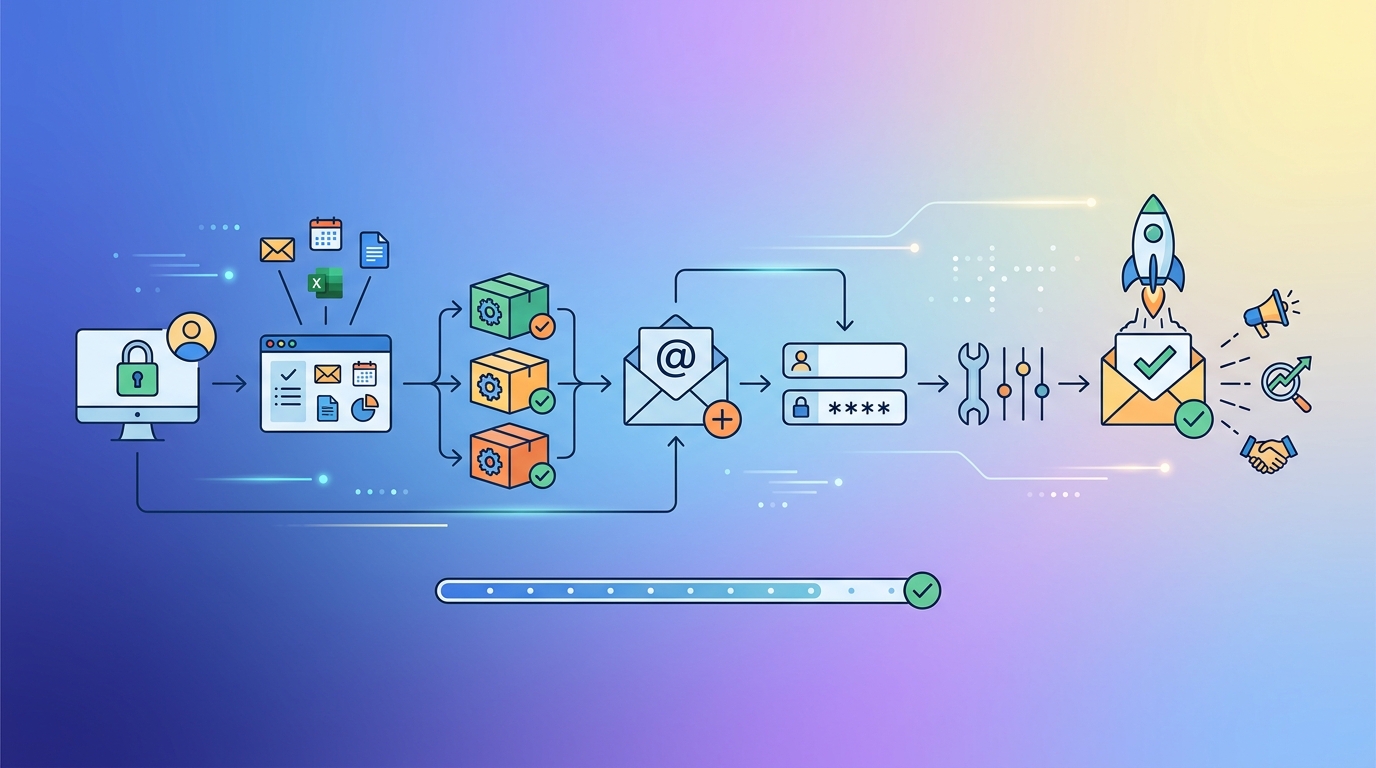
To create a new GoDaddy email account, log into your GoDaddy account, navigate to your Email & Office Dashboard, and select your email plan. Click ‘Create Email Address,’ enter your desired username, set a strong password, and configure any additional settings. The process takes just a few minutes, and you can create multiple email addresses depending on your plan’s allowance.
Can I use GoDaddy email for cold email campaigns and business outreach?
While GoDaddy email can be used for business communication, it’s not optimized for large-scale cold email campaigns. Professional cold email platforms offer better deliverability, automation, personalization at scale, and analytics. Using standard business email servers like GoDaddy for mass outreach may trigger spam filters and damage your domain reputation. Dedicated cold email tools provide warming features and compliance management for better results.
What’s the difference between GoDaddy email and Gmail for business use?
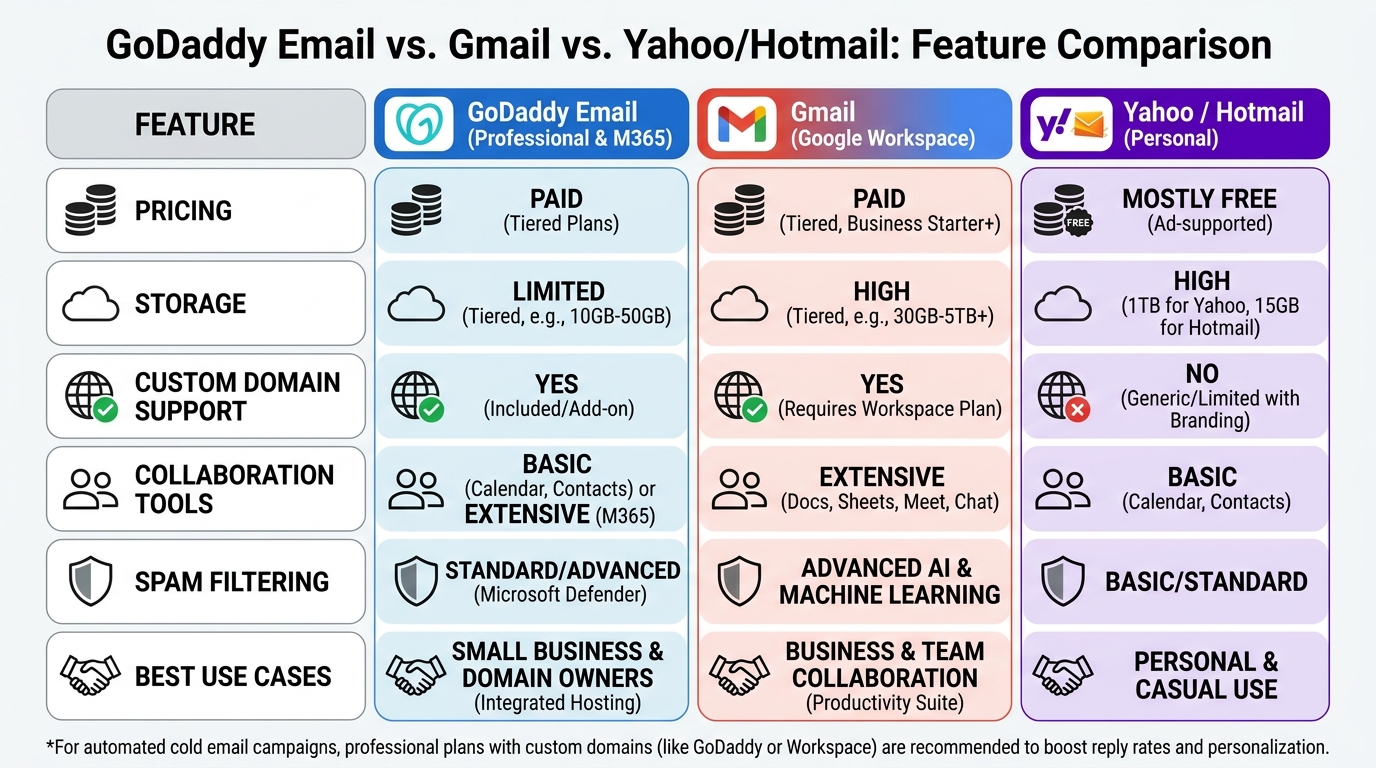
GoDaddy email offers basic email hosting with your custom domain, while Gmail (Google Workspace) provides a comprehensive suite including email, cloud storage, and collaboration tools. Gmail offers better spam filtering, search functionality, and integration with Google apps. GoDaddy is typically more affordable for simple email needs, whereas Gmail suits businesses requiring advanced features, larger storage, and team collaboration capabilities.
How do I sign in to my GoDaddy email account?
To sign in to GoDaddy email, visit the GoDaddy webmail login page or use email.godaddy.com. Enter your complete email address and password. Alternatively, you can configure your GoDaddy email with desktop clients like Outlook or mobile apps using IMAP/POP3 settings. GoDaddy also offers direct access through your account dashboard under the Email & Office section for quick management.
Can I recover my GoDaddy email account if I forget my password?
Yes, you can recover your GoDaddy email account through the password reset process. Visit the GoDaddy login page and click ‘Forgot Password.’ Enter your email address or username, and GoDaddy will send recovery instructions to your registered phone number or alternate email. You’ll need to verify your identity through security questions or two-factor authentication before creating a new password.
What email server settings do I need for GoDaddy business email?
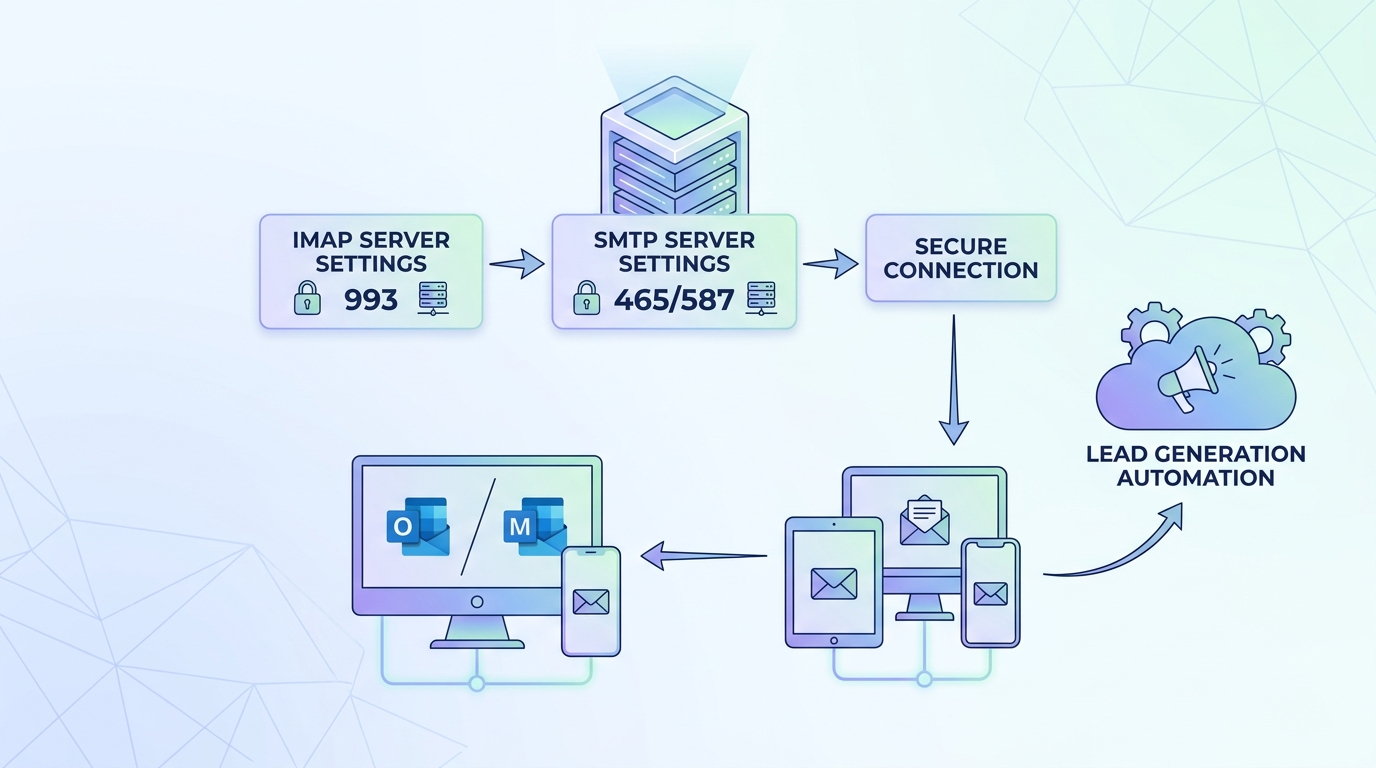
For GoDaddy business email, use these server settings: Incoming (IMAP) server: imap.secureserver.net, port 993 with SSL. Outgoing (SMTP) server: smtpout.secureserver.net, port 465 or 587 with SSL/TLS. Your username is your full email address, and you’ll use your email password. These settings work with most email clients including Outlook, Apple Mail, and mobile devices for seamless synchronization.
How does GoDaddy email compare to other providers like Yahoo, Hotmail, or ATT email?
GoDaddy email is designed for businesses needing professional custom domain addresses, unlike consumer services like Yahoo, Hotmail, or ATT email. While Yahoo and Hotmail offer free personal email, GoDaddy provides business-grade features with your brand’s domain. ATT email is ISP-specific, whereas GoDaddy is independent. GoDaddy offers better professional credibility but requires a paid subscription, making it ideal for businesses prioritizing brand image.
Understanding GoDaddy and Email: Your Complete Guide to Professional Email Solutions
When it comes to establishing a professional online presence, GoDaddy and email services go hand-in-hand for businesses of all sizes. As one of the world’s largest domain registrars and web hosting providers, GoDaddy offers comprehensive email solutions that help entrepreneurs, sales teams, and marketing professionals communicate effectively with their audiences. Whether you’re setting up your first business email or migrating from a personal account, understanding how GoDaddy’s email services work is essential for professional communication.
Professional email addresses build credibility and trust with potential clients. Unlike free email services, a custom domain email (like yourname@yourbusiness.com) demonstrates legitimacy and professionalism that can significantly impact your business development efforts and customer acquisition strategies.
In this comprehensive guide, we’ll explore everything you need to know about GoDaddy’s email offerings, from setup and configuration to advanced features that can transform your outreach campaigns. We’ll also compare GoDaddy with other popular email platforms and provide actionable insights for maximizing your email communication effectiveness. 📧
What Makes GoDaddy Email Services Stand Out
GoDaddy offers multiple email solutions designed to meet different business needs. Their primary offerings include Professional Email (powered by GoDaddy) and Microsoft 365 integration, giving businesses flexibility in choosing the right platform for their communication requirements.
Key Features of GoDaddy Professional Email
GoDaddy’s Professional Email service provides essential features that rival more expensive alternatives. The platform delivers reliable email hosting with your custom domain, ensuring your business communications maintain a consistent brand identity across all touchpoints.
- Custom domain integration: Create unlimited email addresses using your domain name
- Mobile accessibility: Access emails from any device through webmail or mobile apps
- Generous storage: Plans include substantial storage space for emails and attachments
- Security features: Built-in spam filtering and virus protection keep your inbox clean
- Calendar and contacts: Integrated tools for scheduling and contact management
- IMAP/POP support: Connect with desktop email clients like Outlook or Thunderbird
Microsoft 365 Integration with GoDaddy
For businesses requiring advanced collaboration tools, GoDaddy offers Microsoft 365 plans that include the full Office suite. This option provides access to Word, Excel, PowerPoint, and Teams alongside professional email hosting, making it ideal for teams conducting B2B outreach campaigns and managing complex lead generation activities.
The Microsoft 365 integration particularly benefits sales teams who need robust CRM inside sales tools and sophisticated email capabilities for personalized outreach at scale. 🚀
Setting Up Your GoDaddy Email Account: Step-by-Step Process
Getting started with GoDaddy email is straightforward, even for those new to professional email services. The setup process typically takes 15-30 minutes and requires minimal technical knowledge.
Initial Setup Requirements
Before creating your GoDaddy email account, ensure you have an active domain registered through GoDaddy or transferred to their platform. If you need guidance on creating email accounts from scratch, resources like our Gmail Email Account Create guide can help you understand the general email setup process.
| Step | Action Required | Estimated Time |
|---|---|---|
| 1 | Purchase email plan | 5 minutes |
| 2 | Create email addresses | 5 minutes |
| 3 | Configure email client | 10-15 minutes |
| 4 | Test sending/receiving | 5 minutes |
How I Make New Email Addresses on GoDaddy
Creating additional email addresses for team members or departments follows a simple process within the GoDaddy dashboard. Navigate to your email settings, select “Create Email Address,” and follow the prompts to establish new accounts under your domain.
This flexibility allows businesses to create role-based addresses (like sales@yourdomain.com or support@yourdomain.com) that enhance professionalism and organizational clarity. For marketing professionals managing lead generation activities, having dedicated email addresses for different campaigns improves tracking and response management.
Comparing GoDaddy Email with Other Popular Email Platforms
Understanding how GoDaddy stacks up against other email services helps businesses make informed decisions about their email infrastructure. Let’s examine how GoDaddy compares to commonly used platforms.
GoDaddy vs. Gmail for Business
While Gmail (Google Workspace) dominates the business email market, GoDaddy offers competitive advantages for certain use cases. When considering gmail email account create options versus GoDaddy, pricing often becomes the deciding factor for small businesses and startups.
| Feature | GoDaddy Professional Email | Google Workspace |
|---|---|---|
| Starting Price | $1.99/month | $6/month |
| Storage | 10GB-25GB | 30GB-2TB |
| Office Suite | Optional (Microsoft 365) | Included (Google Docs, Sheets) |
| Mobile Apps | Yes | Yes |
| Calendar Integration | Basic | Advanced |
For businesses focused on cold email automation and outreach campaigns, understanding gmail email account recovery processes is equally important as choosing the right platform. Both services offer robust security and recovery options, though Gmail’s integration with other Google services provides additional flexibility.
GoDaddy vs. Yahoo Mail and Hotmail
When comparing GoDaddy to consumer email services like my emails yahoo or log into hotmail email accounts, the professional advantages become clear. While Yahoo and Hotmail (now Outlook.com) offer free personal email, they lack the custom domain capabilities essential for business credibility.
Business development representatives seeking qualified leads understand that sending outreach from a generic Yahoo or Hotmail address significantly reduces response rates compared to professional domain-based emails. The perception of legitimacy directly impacts conversion rates in B2B sales scenarios. 💼
AT&T Email Integration Considerations
Some businesses transitioning from ISP-provided email services like email with att net or managing sign in for att email processes may find GoDaddy’s platform offers greater flexibility and portability. Unlike ISP-tied email addresses, GoDaddy email accounts remain accessible regardless of your internet service provider, providing continuity for your business communications.
Optimizing GoDaddy Email for Sales and Marketing Teams
Professional email services become powerful tools when properly configured for sales and marketing activities. GoDaddy email can be optimized to support sophisticated outreach campaigns and lead generation efforts.
Configuring Email for CRM Inside Sales Integration
Modern crm inside sales strategies require seamless email integration with customer relationship management platforms. GoDaddy email supports IMAP and SMTP protocols that enable connection with popular CRM systems, allowing sales teams to track communications, automate follow-ups, and maintain comprehensive customer interaction histories.
For startup founders building customer acquisition pipelines, this integration capability transforms email from a simple communication tool into a strategic asset that drives measurable business results.
Best Practices for Cold Email Campaigns
When conducting B2B outreach campaigns through GoDaddy email, following established best practices ensures higher deliverability and response rates. Understanding how can we write email content that resonates with prospects requires attention to several critical factors:
- Personalization: Customize subject lines and content for each recipient segment
- Value proposition: Clearly articulate benefits within the first few sentences
- Call-to-action: Include specific, measurable next steps for prospects
- Follow-up sequence: Plan 3-5 touchpoints over several weeks
- Testing: A/B test subject lines, sending times, and message variations
For more insights on crafting effective cold email campaigns, explore our guide on The Best From Line for Cold Emails, which provides proven examples that increase open rates. 📈
Email Server for Business: Technical Considerations
Understanding the technical aspects of your email server for business operations helps troubleshoot issues and optimize performance. GoDaddy’s email infrastructure includes:
| Protocol | Server Address | Port | Security |
|---|---|---|---|
| IMAP | imap.secureserver.net | 993 | SSL/TLS |
| POP3 | pop.secureserver.net | 995 | SSL/TLS |
| SMTP | smtpout.secureserver.net | 465 or 587 | SSL/TLS |
These server settings enable connection with desktop email clients and third-party applications, providing flexibility in how teams access and manage their business communications.
Advanced Email Management with GoDaddy
Beyond basic email functionality, GoDaddy provides advanced features that enhance productivity and communication effectiveness for growing businesses.
Email Filtering and Organization
Effective email management requires robust filtering capabilities. GoDaddy’s email platform allows users to create custom filters that automatically organize incoming messages, reducing inbox clutter and ensuring important communications receive immediate attention.
Sales teams conducting extensive outreach benefit from filters that separate prospect responses from general correspondence, enabling faster response times and improved lead nurturing. Marketing professionals managing lead generation activities can segment communications by campaign or customer segment for better tracking and analysis. 🎯
Mobile Email Access and Synchronization
Modern business requires email accessibility from anywhere. GoDaddy’s mobile support ensures that business development representatives seeking qualified leads can respond promptly to opportunities, regardless of location.
The platform synchronizes across devices, maintaining consistent inbox states and ensuring no message gets overlooked. This synchronization proves particularly valuable for distributed teams collaborating on customer acquisition pipelines.
Email Recall and Error Management
Mistakes happen, and knowing how to manage them professionally matters. While GoDaddy doesn’t offer the same recall functionality as some platforms, understanding email management best practices helps minimize errors. For insights on managing sent email issues, our article on How to Withdraw Gmail Email provides valuable context applicable across platforms.
Security and Compliance Considerations
Email security remains paramount for businesses handling sensitive customer information and proprietary data. GoDaddy implements multiple security layers to protect business communications.
Built-in Security Features
GoDaddy email includes comprehensive security measures that protect against common threats:
- Spam filtering: Advanced algorithms identify and quarantine suspicious messages
- Virus scanning: Automatic scanning of attachments prevents malware distribution
- SSL/TLS encryption: Secure transmission protocols protect data in transit
- Two-factor authentication: Additional login security layer prevents unauthorized access
- Password policies: Enforced complexity requirements strengthen account security
For businesses conducting B2B outreach campaigns, maintaining high security standards protects both company and customer data while preserving sender reputation—critical for email deliverability. 🔒
Compliance and Data Protection
Email communications often fall under regulatory requirements like GDPR, CAN-SPAM, and industry-specific compliance standards. GoDaddy’s infrastructure supports compliance efforts through data center security, encryption, and access controls.
Marketing professionals managing lead generation activities must ensure their email practices align with anti-spam regulations. This includes maintaining proper opt-in records, providing clear unsubscribe mechanisms, and honoring removal requests promptly.
Pricing and Plan Selection
Choosing the right GoDaddy email plan requires understanding your business needs and growth trajectory. GoDaddy offers tiered pricing that accommodates businesses at various stages.
Professional Email Plans
GoDaddy’s Professional Email plans start at budget-friendly price points, making professional email accessible even for solopreneurs and small startups. Plans typically include:
| Plan Type | Storage | Price Range | Best For |
|---|---|---|---|
| Email Essentials | 10GB | $1.99-3.99/month | Solopreneurs, freelancers |
| Email Plus | 25GB | $3.99-5.99/month | Small businesses |
| Microsoft 365 | 50GB-1TB | $6.99-12.99/month | Growing teams, enterprises |
Startup founders building customer acquisition pipelines should evaluate their expected email volume, team size, and collaboration needs when selecting plans. The ability to upgrade as your business grows provides flexibility without requiring platform migration. 💰
Cost-Benefit Analysis for Sales Teams
Sales teams conducting B2B outreach campaigns should consider email costs as an investment in customer acquisition rather than an operational expense. Professional email addresses significantly impact response rates and conversion metrics, often delivering ROI that far exceeds the monthly subscription cost.
When compared to the potential revenue from even a single qualified lead, professional email infrastructure represents a minimal investment with substantial returns.
Troubleshooting Common GoDaddy Email Issues
Even with reliable infrastructure, email issues occasionally arise. Understanding common problems and their solutions minimizes disruption to business communications.
Connection and Access Problems
Login difficulties represent the most common email challenges. If experiencing access issues, verify your username (typically your full email address) and password. Account lockouts may occur after multiple failed login attempts as a security measure.
For persistent access problems, GoDaddy’s account recovery process helps restore access through verification steps similar to gmail email account recovery procedures used by other major email providers.
Delivery and Sending Issues
Email deliverability problems can significantly impact business communications. Common causes include:
- Incorrect SMTP server settings in email clients
- Exceeding sending limits for your plan tier
- Spam filter triggers due to message content or sending patterns
- Domain authentication issues (SPF, DKIM, DMARC records)
- Recipient server rejections or blocks
Business development representatives seeking qualified leads must maintain excellent sender reputation to ensure messages reach prospect inboxes. Monitoring bounce rates, spam complaints, and engagement metrics helps identify and address deliverability issues proactively. 📊
Storage and Performance Optimization
As email accumulates, storage capacity and performance may degrade. Regular inbox maintenance—including archiving old messages, deleting unnecessary emails, and managing attachments—keeps accounts running smoothly.
For teams managing extensive email correspondence through crm inside sales systems, implementing retention policies and automated archiving prevents storage issues while maintaining searchable communication histories.
Integrating GoDaddy Email with Marketing Automation Tools
Modern marketing requires integration between email platforms and specialized automation tools. GoDaddy email can be connected with various marketing and sales automation platforms to enhance campaign effectiveness.
Email Automation for Lead Generation
Marketing professionals managing lead generation activities benefit from automation tools that streamline repetitive tasks while maintaining personalization. Cold email platforms can connect with GoDaddy accounts through SMTP integration, enabling automated follow-up sequences and response tracking.
For businesses serious about scaling their outreach efforts, dedicated cold email automation tools provide capabilities beyond basic email platforms. These tools help sales teams conducting B2B outreach campaigns personalize at scale while maintaining high deliverability rates.
If you’re looking to enhance your lead generation efforts beyond basic email functionality, consider exploring specialized solutions. Visit our website to discover how Meetbound can help automate your cold email campaigns, personalize at scale, and boost reply rates with powerful outreach tools designed for modern sales teams. 🚀
Finding and Verifying Prospect Email Addresses
Effective outreach begins with accurate contact information. For teams building prospect lists, our guide on How to Find Someone’s Email on Facebook provides proven methods for discovering professional contact information.
Email verification tools integrate with GoDaddy accounts to validate addresses before sending, reducing bounce rates and protecting sender reputation—critical factors for successful cold email campaigns.
Building an Effective Email Communication Strategy
Technology alone doesn’t guarantee email success. Developing a comprehensive communication strategy maximizes the value of your GoDaddy email investment.
Email Etiquette and Professional Communication
Professional email communication follows established conventions that enhance credibility and response rates. Key principles include:
- Clear subject lines: Accurately describe message content in 6-8 words
- Concise messaging: Respect recipient time with focused, scannable content
- Professional tone: Balance friendliness with appropriate formality
- Timely responses: Reply to inquiries within 24 hours when possible
- Proper formatting: Use paragraphs, bullets, and white space for readability
Understanding how can we write email messages that resonate requires attention to audience needs and communication context. Startup founders building customer acquisition pipelines should develop email templates that maintain consistency while allowing personalization for individual prospects. ✍️
Response Management and Follow-up Protocols
Systematic follow-up separates successful sales teams from those struggling to generate pipeline. Establishing clear protocols for response timing, follow-up frequency, and escalation criteria ensures no opportunity falls through the cracks.
For insights on maintaining professional communication during extended processes, our article on Thank You for Your Patience phrases provides valuable alternatives that strengthen prospect relationships.
Migrating to GoDaddy Email from Other Platforms
Businesses transitioning from other email providers need clear migration strategies to minimize disruption. GoDaddy provides tools and support for importing existing email data.
Migration Planning and Execution
Successful email migration requires careful planning across several phases:
- Inventory assessment: Document current email accounts, storage usage, and dependencies
- Timeline development: Establish migration schedule with minimal business impact
- Data backup: Create complete backups of existing email data before migration
- Account creation: Set up corresponding accounts in GoDaddy system
- Data transfer: Use migration tools or IMAP sync to move messages
- Testing phase: Verify all data transferred correctly and functionality works
- Cutover: Update DNS records and redirect email flow to new system
- Monitoring: Watch for issues during first week post-migration
Business development representatives seeking qualified leads should plan migrations during slower periods to avoid missing time-sensitive opportunities during the transition. 🔄
Maintaining Business Continuity During Migration
Email downtime can cost businesses opportunities and revenue. Strategies for maintaining continuity include:
- Migrating accounts in phases rather than all at once
- Maintaining old email access temporarily during transition
- Setting up email forwarding to ensure no messages are lost
- Communicating migration timeline to team members and key contacts
- Having rollback plan if serious issues emerge
Future-Proofing Your Email Infrastructure
Email technology continues evolving, and businesses must adapt to remain competitive. Understanding emerging trends helps ensure your GoDaddy email setup remains effective long-term.
Emerging Email Technologies and Standards
Recent developments in email authentication, privacy regulations, and AI-powered features are reshaping business email. GoDaddy regularly updates their platform to support new standards like enhanced DMARC policies and improved mobile experiences.
Sales teams conducting B2B outreach campaigns should stay informed about deliverability best practices as major email providers like Gmail and Outlook implement stricter sender requirements. Maintaining proper authentication and engagement metrics becomes increasingly critical for inbox placement. 🔮
Scaling Email Infrastructure with Business Growth
As businesses expand, email needs evolve. GoDaddy’s flexible plans accommodate growth without requiring platform changes. Consider upgrading to Microsoft 365 integration when teams need enhanced collaboration tools or when email volume exceeds basic plan capabilities.
For rapidly growing sales teams, exploring specialized tools becomes necessary. If you’re managing extensive outreach campaigns or need advanced features like email warming and deliverability optimization, check out our Top 10 Lemwarm Alternatives for platforms designed specifically for cold email at scale.
Maximizing ROI from Your GoDaddy Email Investment
Professional email represents an investment in business infrastructure. Maximizing returns requires strategic implementation and continuous optimization.
Measuring Email Effectiveness
Track key metrics to evaluate email performance and identify improvement opportunities:
| Metric | What It Measures | Target Range |
|---|---|---|
| Open Rate | Percentage of recipients opening emails | 15-25% (cold email) |
| Response Rate | Percentage of recipients replying | 5-10% (cold email) |
| Bounce Rate | Percentage of undeliverable emails | Below 5% |
| Unsubscribe Rate | Percentage opting out | Below 0.5% |
Marketing professionals managing lead generation activities should establish baseline metrics and continuously test variations to improve performance. Small improvements in response rates can significantly impact pipeline generation and revenue. 📈
Continuous Improvement Through Testing
Systematic A/B testing reveals what resonates with your audience. Test variables including:
- Subject line length and style
- Sending time and day of week
- Message length and structure
- Call-to-action placement and wording
- Personalization elements and depth
Startup founders building customer acquisition pipelines should implement testing protocols from the beginning, establishing data-driven decision-making cultures that scale with business growth.
Conclusion: Leveraging GoDaddy Email for Business Success
Understanding GoDaddy and email capabilities empowers businesses to communicate professionally and effectively with prospects and customers. From basic setup through advanced integration with sales and marketing tools, GoDaddy provides flexible email solutions that accommodate businesses at various growth stages.
Professional email infrastructure represents far more than simple message transmission—it’s a strategic asset that influences brand perception, enables systematic outreach, and supports scalable customer acquisition. Whether you’re a solopreneur establishing your first professional presence or a growing sales team conducting extensive B2B outreach campaigns, GoDaddy’s email platform provides the foundation for effective business communication. 🎯
The key to email success lies not just in choosing the right platform, but in implementing strategic processes that maximize engagement and conversion. From proper technical configuration through thoughtful message crafting and systematic follow-up, every element contributes to overall effectiveness.
For businesses serious about scaling their email outreach and lead generation efforts, specialized automation tools can amplify results beyond what basic email platforms offer alone. Ready to transform your cold email campaigns and boost reply rates? Visit our website to discover how Meetbound’s powerful outreach tools help sales teams automate campaigns, personalize at scale, and generate more qualified leads faster. Start building your customer acquisition pipeline with proven email automation designed for modern B2B sales success! 🚀
Article created using IntentRank